 mz.

I spend a lot of time in log files. Debugging API errors, tracing auth failures, digging through Nginx access logs — pretty much every server problem starts with grep or rg. I have used both for years but never actually timed them head-to-head on real data, so I set up a 200 MB synthetic log and ran four benchmarks: fixed-string search, regex matching, case-insensitive lookup, and recursive search across 50 split files. Here is what came out.
ripgrep: github.com/BurntSushi/ripgrep | GNU grep: gnu.org/software/grep
- Two vCPU Linux machine (Ubuntu 26.04, 3.3 GB RAM)
- ripgrep 15.1.0 (installed via
apt install ripgrep) - GNU grep 3.12 (pre-installed)
- Python 3 with matplotlib for the chart
- Synthetic log data — all IPs use RFC 5737 test ranges (203.0.113.x, 198.51.100.x, 192.0.2.x)
Method
I generated a 200 MB JSON-lines log file with 900,319 entries using a seeded Python script so the results are reproducible. The dataset contains realistic HTTP traffic patterns: ~65% 200 OK, ~8% 404, ~4% each of 4xx and 5xx, plus 3% of lines carrying error messages like auth failed for token and Connection reset by peer. Every benchmark ran against cold caches (echo 3 > /proc/sys/vm/drop_caches) to simulate a first-run scenario on a production server.
Benchmark Results
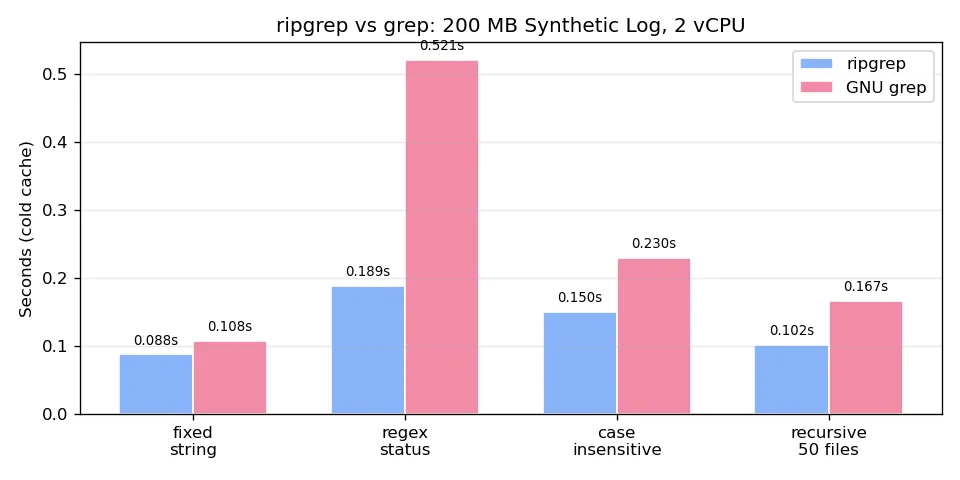
1. Fixed-String Search
Pattern: auth failed for token — a typical error string lookup.
grep -cF "auth failed for token" synthetic-app.logrg -cF "auth failed for token" synthetic-app.log# grep: 29,156 matches in 0.108s
# rg: 29,156 matches in 0.088s2. Regex Status-Code Match
Pattern: status": (5[0-9]{2}|4[0-9]{2}) — captures all 4xx and 5xx responses.
grep -cE 'status": (5[0-9]{2}|4[0-9]{2})' synthetic-app.log
rg -c 'status": (5[0-9]{2}|4[0-9]{2})' synthetic-app.log# grep: 224,725 matches in 0.521s
# rg: 224,725 matches in 0.189s3. Case-Insensitive Search
Pattern: timeout (case-insensitive) — messages like timeout after 3000ms.
grep -ciE timeout synthetic-app.log
rg -ci timeout synthetic-app.log# grep: 29,017 matches in 0.230s
# rg: 29,017 matches in 0.150s4. Recursive Search (50 Files)
Split the 200 MB log into 50 ~4 MB files and searched for Connection reset by peer across the directory.
grep -rcF "Connection reset by peer" .
rg -cF "Connection reset by peer" .# grep: 28,915 matches in 0.167s
# rg: 28,915 matches in 0.102s| Benchmark | ripgrep | GNU grep | Speedup |
|---|---|---|---|
| Fixed string | 0.088 s | 0.108 s | 1.2x |
| Regex (4xx/5xx) | 0.189 s | 0.521 s | 2.8x |
| Case-insensitive | 0.150 s | 0.230 s | 1.5x |
| Recursive (50 files) | 0.102 s | 0.167 s | 1.6x |
Observations
ripgrep won every benchmark, but the margin varies by workload. The regex test showed the biggest gap — grep took 2.8x longer because it does not use SIMD-accelerated pattern matching like rg does. On simple fixed-string lookups the difference was small (0.02 s), barely noticeable in interactive use. The recursive search also favoured rg, which is designed to respect .gitignore and skip binary files out of the box.
That said, grep is everywhere — it ships on every Linux box, needs no installation, and its POSIX flags are a known quantity in scripts. If you are writing a portable shell script for multiple environments, grep is the safe choice. For day-to-day log wrangling on your own servers, ripgrep saves noticeable time, especially on regex-heavy queries.
Verdict
ripgrep is the faster tool on every test here. If you process logs daily and can install one package, switch to rg. But grep remains the right call for portable scripts, CI images, and environments where you cannot add dependencies. I now alias grep to rg on my workstation and keep using grep in Dockerfiles — both have their place.
Related
More comparisons: jq vs Python on a 100K-line log, caddy vs nginx static file serving, and masscan vs nmap on a 256-host range.