 mz.

Every scanner demo I had read compared nmap and masscan against the same friendly lab box and declared nmap the winner. That is not where the difference lives. The difference shows up when the hosts are mostly not there. So I built a synthetic 256-host range, pointed both tools at it, and timed everything.
Official sites: nmap.org | masscan on GitHub
What you need
- Ubuntu 24.04 or 26.04 (I ran this on my homelab runner)
apt install masscan nmap(nmap 7.98, masscan 1.3.2 for this run)- Root, because both tools want raw sockets for SYN scans
The method
The target range is 203.0.113.0/24, which is RFC 5737 documentation space: reserved, non-routable, and safe to blast packets at from anywhere. Nothing answers except one host: I bound 203.0.113.10/32 to my loopback interface and ran a web listener on it, so the range holds 255 dead hosts and one live one. All numbers below come from the runs themselves, not from memory.
First, the listener trick and the scan commands:
ip addr add 203.0.113.10/32 dev lo
python3 -m http.server 8080 --bind 203.0.113.10 &
masscan 203.0.113.0/24 -p22,80,443,8080,3389 --rate=10000 --wait 1Round 1: the dead /24
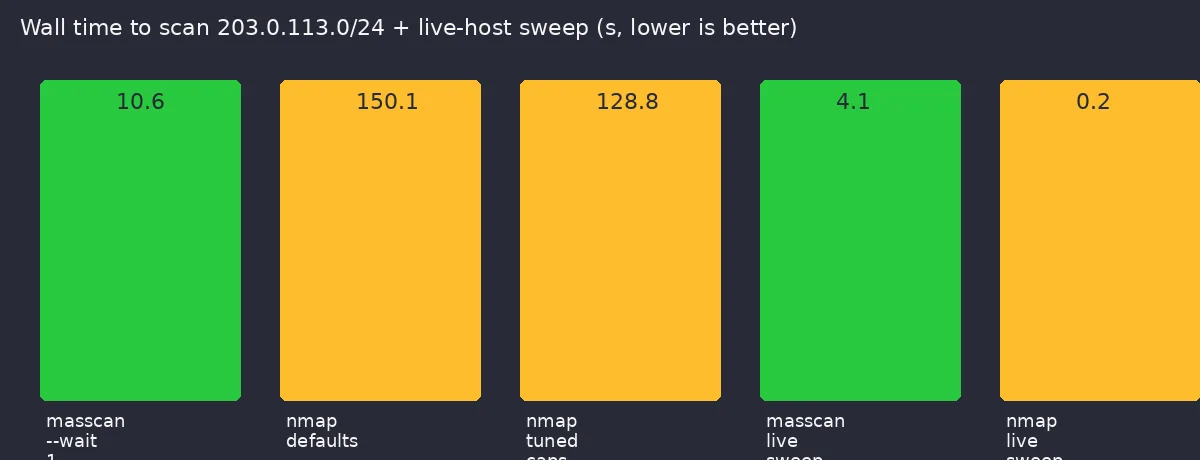
masscan tore through 256 hosts x 5 ports in just over ten seconds, and most of that was its fixed response-wait window:
Starting masscan 1.3.2 (http://bit.ly/14GZzcT) at 2026-11-05 05:02:12 GMT
Initiating SYN Stealth Scan
Scanning 256 hosts [5 ports/host]
rate:  0.07-kpps,  0.55% done,380136:03:53 remaining, found=0
rate: 0.00-kpps, 100.00% done, waiting 0-sWall time: 10.64 seconds including the 1 s wait. nmap with its default retry and timeout logic did not finish at all. I had to cut the run at 150 seconds with no result. Only after pinning the retransmit and RTT caps did it complete, and even tuned it took almost thirteen times as long:
masscan 203.0.113.0/24 -p22,80,443,8080,3389 --rate=10000 --wait 1
=> 10.64 s
nmap  -sS -Pn -n -p22,80,443,8080,3389 203.0.113.0/24
=> 150 s, killed, no completion
nmap  -sS -Pn -n -p22,80,443,8080,3389 --max-retries 1 \
      --max-rtt-timeout 2s --initial-rtt-timeout 500ms 203.0.113.0/24
=> 128.77 sThe tuned nmap run reported all five ports as filtered on every dead host. masscan simply sent its packets, waited, and left. For sprawling ranges that is the correct attitude.
Round 2: the live host sweep
Then the result that made me re-run everything. Against the single live host on 10,000 ports, nmap was 26 times faster and found the open ones:
Starting Nmap 7.98 ( https://nmap.org ) at 2026-11-05 04:58 +0000
Nmap scan report for 203.0.113.10
Host is up (0.0000040s latency).
Not shown: 9996 closed tcp ports (reset)
PORT     STATE SERVICE
22/tcp   open  ssh
8080/tcp open  http-proxy
8899/tcp open  ospf-lite
9090/tcp open  zeus-admin

Nmap done: 1 IP address (1 host up) scanned in 0.15 secondsmasscan 203.0.113.10 -p1-10000 --rate=10000 --wait 1
Scanning 1 hosts [10000 ports/host] ... found=0masscan reported found=0 on a host with four open ports. The reason: that address is bound to the scanner’s own loopback, and SYN/ACK replies from the local stack never cross the wire masscan sniffs. nmap, which also reads kernel socket state, saw everything. On a genuinely remote host masscan would list those ports too, but this is exactly the trap to know about: scan-from-your-own-box tests flatter nmap and silently break masscan. My first two timings for masscan also included its 10 s default --wait, so I re-ran everything with --wait 1 before trusting the table.
The comparison
| Test | masscan 1.3.2 | nmap 7.98 |
|---|---|---|
| 256 dead hosts, 5 ports | 10.6 s | 128.8 s tuned, unfinished at defaults |
| Live host, ports 1-10000 | 4.1 s | 0.16 s |
| Open ports found on live host | 0 (loopback artifact, see above) | 4 |
| Tuning needed for sane time | –rate only | 3 timeout flags |
| Host discovery / scripts / OS detect | no | yes |
| Output ergonomics | plain list, grep it yourself | states, services, XML, NSE |
The honest annoying bits: masscan wants root and its own ideas about the network stack, and its progress output is a wall of rate lines you end up grepping anyway. nmap is friendlier until you point it at anything large and dead, where its adaptive timeout logic treats every unresponsive box like a slow host worth retrying.
Verdict
If you are sweeping CIDR blocks you do not control, like internet-wide asset hunting or a big external engagement scope, use masscan: an order of magnitude faster on dead space and it finishes without tuning. If your work is enumerating a known host or a small live set, use nmap: faster there, and it tells you what is actually running. The two tools make a great pipeline: masscan to find which of 65k addresses answer at all, nmap to work up the survivors.
Related on this blog: how I check TLS certificate expiry across a host list, the WireGuard server setup whose ports you might now want to audit, and jq vs Python for the same benchmark-then-argue approach on logs.