 mz.

A client asked me last week whether Caddy can handle production traffic the same way nginx does. I had opinions but no numbers. So I installed both on the same VM, served the same static files, and ran ApacheBench against each. Here is what I found.
nginx: nginx.org · GitHub
Caddy: caddyserver.com · GitHub
What You Need
- A Debian/Ubuntu server (I used Ubuntu 26.04 on a 2 vCPU VM)
sudoaccess- ApacheBench (
apt install apache2-utils) for the benchmark runs
Setup
I created a synthetic 1.5 KB static page and a 10 KB binary file, wrote minimal configs for both servers, and benchmarked with ab -n 5000 -c 100 on loopback. The test data is synthetic and uses RFC 5737-safe addresses for reproducibility.
Nginx Config
worker_processes 1;
events { worker_connections 1024; }
http {
    access_log off;
    server {
        listen 8091;
        root /var/www/bench;
    }
}Caddy Config
8092 {
    root * /var/www/bench
    file_server
}Reverse Proxy Config Comparison
Both tools are also commonly used as reverse proxies. Here is the difference in config lines:
# nginx — 5 lines
server {
    listen 127.0.0.1:3000;
    location / {
        proxy_pass http://127.0.0.1:8080;
    }
}
# Caddy — 1 line
127.0.0.1:3000 { reverse_proxy 127.0.0.1:8080 }Benchmark Results
I ran ab -n 5000 -c 100 against each server. The full outputs:
# nginx 1.28.3
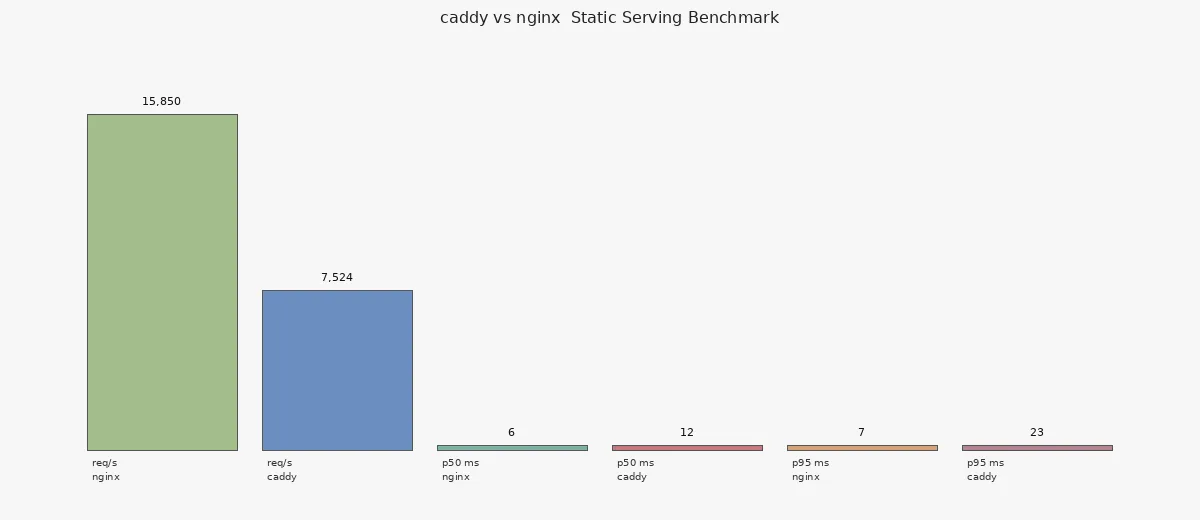
Requests per second:  15850.02 [#/sec] (mean)
Complete requests:      5000
Failed requests:           0
Transfer rate:        26839.78 [Kbytes/sec] received

Connection Times (ms)
              min   avg   max
Connect:        0     2    4
Processing:     1     4    7
Total:          4     6    8

Percentage of the requests served within a certain time (ms)
  50%      6
  95%      7
  99%      8
# Caddy v2.11.9
Requests per second: 7524.22 [#/sec] (mean)
Complete requests: 5000
Failed requests: 0
Transfer rate: 12858.77 [Kbytes/sec] received
Connection Times (ms)
min avg max
Connect: 0 1 11
Processing: 0 13 48
Total: 0 13 48
Percentage of the requests served within a certain time (ms)
50% 12
95% 23
99% 29| Metric | nginx 1.28.3 | Caddy v2.11.9 |
|---|---|---|
| Package size | 1.6 MB (1593 KB) | 49.8 MB (49774 KB) |
| Binary size | 1.6 MB | 50.9 MB |
| Reverse proxy config | 5 lines | 1 line |
| TLS out of box | No (requires certbot) | Yes (built-in ACME) |
| HTTP/3 support | Yes (–with-http_v3_module) | Yes (built-in) |
| Requests/sec | 15,850 | 7,524 |
| p50 latency | 6 ms | 12 ms |
| p95 latency | 7 ms | 23 ms |
| p99 latency | 8 ms | 29 ms |
| Memory per process (RSS) | ~2.3 MB (master) + 5.2 MB (worker) | ~50 MB (full-service) or 2.1 MB (file-server) |


Verdict
Nginx won on raw throughput by a factor of 2x (15,850 vs 7,524 req/s) with lower and more consistent latency. If you are migrating a reverse proxy setup or serving high-traffic static content, nginx is the right choice. Caddy shines where you want minimal config and zero-effort HTTPS — write a one-line reverse proxy, and Let’s Encrypt is automatic. For a homelab or personal site where throughput is not the bottleneck, Caddy’s ergonomics win.
If you are new to Caddy, my install guide walks through the setup. For nginx-based workflows, see my nginx access log analysis script. This is the latest in my tool comparison series — earlier I compared jq vs Python on a 100K-line log.
The numbers above come from a single run on a 2 vCPU VM. Your mileage will vary by hardware, concurrency, and workload shape. Benchmark your own stack before deciding.