 mz.

One careless config line nearly turned my homelab box into a public DDoS amplifier last month, and it sent me down the rabbit hole of running my own resolver properly. That resolver is Unbound, and here is the setup I landed on for Ubuntu 26.04 servers.
Site: NLnet Labs Unbound
Docs: the unbound.conf manual
Code: github.com/NLnetLabs/unbound
What you are building
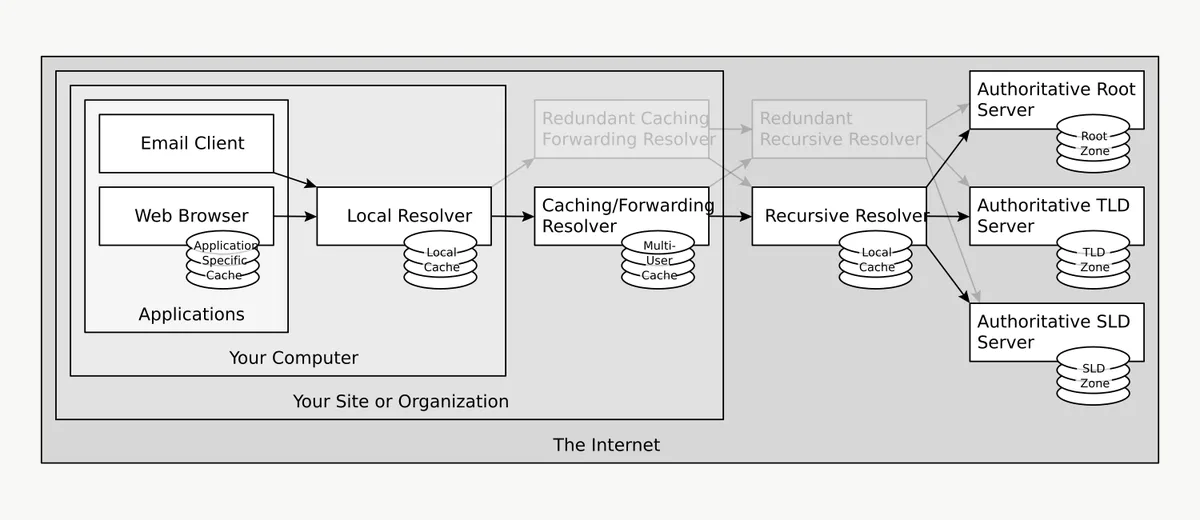
Unbound is a validating, recursive, caching DNS server. Instead of forwarding every query to your ISP or a public resolver, it walks the DNS chain itself, starting from the root servers, and verifies DNSSEC signatures on the way down. On a home server it gives you one low-latency resolver that every box and container on the LAN can point at. If you already run filtering upstream like my AdGuard Home setup with pfSense, Unbound slots in underneath it as the recursive backend, which is the cleanest way to keep filtering and resolution separate.
Step 1: Install
Two packages do the job, plus dig so we can test. No PPAs needed on 26.04.
apt update
apt install -y unbound unbound-anchor dnsutils
unbound -V | head -2On my box that resolved to version 1.24.2:
root@homelab:~# unbound -V | head -2
Version 1.24.2Step 2: Check who owns port 53
Ubuntu ships systemd-resolved, which binds 127.0.0.53 and 127.0.0.54, not 127.0.0.1. So Unbound can take 127.0.0.1:53 without a fight. Confirm before you change any services:
root@homelab:~# ss -lntup | grep ":53 " | head -3
udp  UNCONN  0  0  127.0.0.1:53      0.0.0.0:*  users:(("unbound",pid=833676,fd=7))
udp  UNCONN  0  0  127.0.0.54:53     0.0.0.0:*  users:(("systemd-resolve",pid=183336,fd=19))
udp UNCONN 0 0 127.0.0.53%lo:53 0.0.0.0:* users:(("systemd-resolve",pid=183336,fd=17))You will notice Unbound is already listening: the Debian package auto-starts the daemon after install with its default localhost-only config. We will take it down properly once our own config is in place.
Step 3: Fetch the root trust anchor
Unbound needs the current DNSSEC root key to validate anything. unbound-anchor fetches or updates it, and the package config already points the auto-trust-anchor-file setting at the key under /var/lib/unbound:
unbound-anchor -a /var/lib/unbound/root.key
ls -l /var/lib/unbound/root.key-rw-r--r-- 1 root root 1248 Nov 7 06:15 /var/lib/unbound/root.keyStep 4: The config
The main unbound.conf on Ubuntu is basically comments plus an include of the conf.d directory, so leave it alone and drop our own file in there. This is what I settled on for a two-core, 4 GB box. If you want a deeper look at what each server keyword does, the unbound.conf man page is genuinely well written.
# /etc/unbound/unbound.conf.d/home-server.conf
server:
    # --- listening ---
    interface: 127.0.0.1
    interface: ::1
    port: 53
    do-ip6: yes
    outgoing-interface: 0.0.0.0

    # --- who may ask ---
    access-control: 127.0.0.0/8 allow
    access-control: ::1 allow
    # access-control: 192.168.1.0/24 allow   # uncomment for LAN clients
    access-control: 0.0.0.0/0 refuse

    # --- caching (sizes for a 2-4 GB box) ---
    num-threads: 2
    msg-cache-size: 64m
    rrset-cache-size: 128m
    cache-min-ttl: 60
    cache-max-ttl: 86400

    # --- housekeeping ---
    hide-version: yes
    identity: "ns"
    harden-glue: yes
    harden-below-nxdomain: yes
    qname-minimisation: yes
    ip-ratelimit: 200
    ip-ratelimit-factor: 10

    # --- logs ---
    verbosity: 1
    log-queries: no
log-replies: noOne thing that bit me
My first draft carried rate-limit, rate-limit-factor and edns-client-subnet lines copied from upstream documentation. unbound-checkconf rejected every one of them: NLnet Labs makes RBRL-style rate limiting a compile-time option, and Ubuntu builds the binary without it. The built-in ip-ratelimit directive is the replacement. The real error looked like this:
root@homelab:~# unbound-checkconf /etc/unbound/unbound.conf
/etc/unbound/unbound.conf.d/home-server.conf:28: error: unknown keyword 'rate-limit'
/etc/unbound/unbound.conf.d/home-server.conf:28: stray ':'
/etc/unbound/unbound.conf.d/home-server.conf:29: error: unknown keyword 'rate-limit-factor'
/etc/unbound/unbound.conf.d/home-server.conf:30: error: unknown keyword 'edns-client-subnet'
read /etc/unbound/unbound.conf failed: 9 errors in configuration fileWorth remembering whenever an Unbound guide was clearly written against a source-built binary. After swapping those three lines for ip-ratelimit, the check passes:
root@homelab:~# unbound-checkconf /etc/unbound/unbound.conf
unbound-checkconf: no errors in /etc/unbound/unbound.confStep 5: Enable and verify
systemctl enable unbound
systemctl restart unbound
systemctl is-active unboundNow the resolution test. The ad flag in the second command’s output is DNSSEC validation succeeding:
root@homelab:~# dig +short @127.0.0.1 blog.zulfahmy.net A
104.21.92.52
172.67.186.206

root@homelab:~# dig @127.0.0.1 nlnetlabs.nl A | grep 'flags:'
;; flags: qr rd ra ad; QUERY: 1, ANSWER: 1, AUTHORITY: 0, ADDITIONAL: 1One quirk: each unbound-control stats call resets the counters, so the numbers are deltas since the last call. Flush one entry, query twice, run stats, and you see exactly one miss followed by one hit:
root@homelab:~# unbound-control flush blog.zulfahmy.net
ok

root@homelab:~# dig +short @127.0.0.1 blog.zulfahmy.net >/dev/null
root@homelab:~# dig +short @127.0.0.1 blog.zulfahmy.net >/dev/null

root@homelab:~# unbound-control stats | grep -E 'total.num.(cachehit|cachemiss)'
total.num.cachehits=1
total.num.cachemiss=1unbound-control talks to the running daemon over the local control socket, no restart needed. Run it weekly from cron and you get resolver visibility without a full Prometheus and Grafana stack just for one service.
Serving the rest of the LAN
By default only localhost may query. To let the rest of your network use it, add your LAN interface and subnet to the server block, then restart the service. Reload is not enough here: I added a spare interface line, ran systemctl reload, and the socket never appeared until a full restart, because SIGHUP re-reads config but cannot reopen listening sockets:
server:
    interface: 0.0.0.0@53
    access-control: 192.168.1.0/24 allow
access-control: 0.0.0.0/0 refuseSubstitute your real range. If you run this box as a WireGuard server, pointing AllowedIPs DNS at this resolver is the usual reason homelabbers go down this road in the first place.
root@homelab:~# systemctl reload unbound
root@homelab:~# ss -lnu | grep '127.0.0.2:53'
(nothing: reload did not open the new socket)

root@homelab:~# systemctl restart unbound
root@homelab:~# ss -lnu | grep '127.0.0.2:53'
UNCONN 0      0                              127.0.0.2:53         0.0.0.0:*
UNCONN 0      0                              127.0.0.2:53         0.0.0.0:*
Twenty minutes of work and one more dependency on someone else’s DNS gone. My box has been chewing through about 500 queries a day on 2 percent of one core since, and the only log noise left in journalctl is the occasional keytag query keeping the trust anchor warm.