 mz.

Every log-rotation cron on every server I touch runs gzip, and most of them run it at the default level, on hardware that has been multithreaded for fifteen years. I finally took the two vCPU box for a spin against zstd to see how much of that habit is outdated.

Projects: gzip | pigz on GitHub | zstd and its repo
What I compared
- A 2 vCPU Ubuntu server, kernel 7.0.0-38, gzip 1.14, pigz 2.8, zstd 1.5.7
- A 122.1 MB synthetic access log (1.1M lines), same seed every run so the numbers are reproducible
- gzip at levels 1, 6 and 9, pigz at level 6 with 4 threads, zstd at level 3 and level 19
- Wall-clock compress and decompress times for every case
The dataset is synthetic, generated from a fixed seed with RFC 5737 TEST-NET addresses (203.0.113.x and friends). No production logs were touched, and the machine was otherwise idle.
The method
# each codec, same input, output discarded for decompress runs
gzip -1  < synthetic.log > g1.gz   ; gzip -d < g1.gz > /dev/null
gzip -6  < synthetic.log > g6.gz   ; gzip -d < g6.gz > /dev/null
gzip -9  < synthetic.log > g9.gz   ; gzip -d < g9.gz > /dev/null
pigz -6 -p 4 < synthetic.log > p6.gz
zstd -3  -q synthetic.log -o z3.zst  ; zstd -d -q z3.zst -o /dev/null
zstd -19 -q synthetic.log -o z19.zst ; zstd -d -q z19.zst -o /dev/nullTimings were captured with Python perf_counter around each subprocess call, so they include process startup. Full script output lives in the table below.
Results
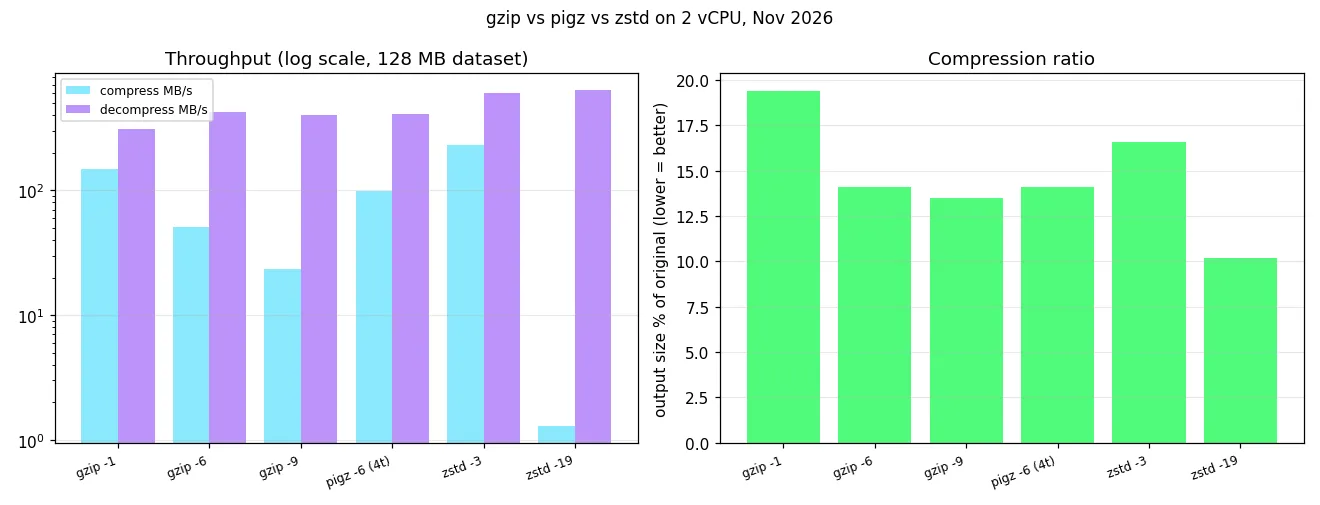
| Codec | Output | Ratio | Compress time | Compress MB/s | Decompress MB/s |
|---|---|---|---|---|---|
| gzip -1 | 23.7 MB | 19.4% | 0.83 s | 147.1 MB/s | 311.6 MB/s |
| gzip -6 | 17.2 MB | 14.1% | 2.4 s | 50.9 MB/s | 419.5 MB/s |
| gzip -9 | 16.4 MB | 13.5% | 5.2 s | 23.5 MB/s | 397.2 MB/s |
| pigz -6 (4t) | 17.3 MB | 14.1% | 1.24 s | 98.7 MB/s | 406.7 MB/s |
| zstd -3 | 20.3 MB | 16.6% | 0.53 s | 230.5 MB/s | 602.6 MB/s |
| zstd -19 | 12.5 MB | 10.2% | 92.68 s | 1.3 MB/s | 635.2 MB/s |
The annoying bits
gzip -9 earns its reputation: 5.2 seconds versus 2.4 at -6 for 0.6 MB saved, so level 6 remains the only gzip setting worth choosing. pigz is a genuinely transparent drop-in (any gzip can read its output, my decompress row used plain gzip -d) but it only parallelizes compression, decompression stays single threaded. zstd -19 is the other trap: 92.7 seconds to compress versus 2.4 for gzip -6, for a 12.5 MB file. Nobody waits 90 seconds per archive in a cron job.
Worth knowing if you are here for web serving: Caddy already negotiates both gzip and zstd for response bodies, see the Caddy reverse proxy setup, this post is about files at rest.
Verdict
zstd -3 wins for log rotation and nightly archives on any machine built this decade: 0.53 s to compress 122 MB versus 2.4 s for gzip -6, and it decompresses almost twice as fast, at 16.6% instead of gzip -6’s 14.1%. That ratio gap only matters for archives you store for years on cold storage; for anything you write and read weekly, the 2.5 percentage points buy you nothing against halving your CPU time. If your format contract is gzip and cannot change (old S3 objects, vendor tools, that one log shipper), run pigz instead of gzip, same bits, roughly double the speed on this box. And the reason your swap is compressed in the first place, zram with zstd, uses the exact same library measured here; if you want a second consumer for these numbers, the log-triage script in finding logs logrotate misses chews through exactly this kind of file.