 mz.

I was pushing memory on a 3.3 GB Proxmox VM the other week and noticed my 7 GB of disk swap barely budged from 5% usage despite the OOM killer starting to eye processes. That is when I remembered zram — Linux’s built-in compressed block device that stores swap pages in RAM before they ever touch the disk. It shipped with the kernel ages ago, but on Ubuntu the systemd-zram-generator package makes it a one-file config. Here is how I set it up.
GitHub: systemd/zram-generator
Kernel docs: zram kernel docs


What zram Does
Zram creates a swap device in RAM that compresses every page written to it. The kernel writes pages to zram, compresses them with lzo-rle (default on current kernels), and keeps the compressed data in system memory. When a page is read back, it decompresses on the fly. Real-world compression ratios hit 1.5–2:1 on typical server workloads — in my test, 168 MB of anonymous pages shrank to 108 MB. That is effectively 50–60% more usable swap without touching a disk spindle or SSD write cycle.
Install systemd-zram-generator
The package is in the Ubuntu repos since 24.04. One command:
sudo apt update
sudo apt install -y systemd-zram-generatorYou can verify it installed with dpkg -l | grep zram-generator.
Write the Configuration
Create /etc/systemd/zram-generator.conf with a single section for the first zram device. I set mem-size-ratio=0.5 so the zram device gets half of the system RAM (1.7 GB on my 3.3 GB VM), and priority=100 to make it preferred over disk swap: Once zram is live, pair it with Glances to track real-time compression ratios.
sudo cat > /etc/systemd/zram-generator.conf << 'EOF'
[zram0]
mem-size-ratio=0.5
priority=100
zram-filesystem=swap
EOFStart the zram Service
The generator converts the config into a systemd unit. Reload daemon files and start the setup service:
sudo systemctl daemon-reload
sudo systemctl start [email protected]
Check It Is Live
Three commands tell you everything you need:
swapon --show
NAME       TYPE      SIZE   USED PRIO
/dev/dm-1  partition   4G 395.7M   -1
/dev/zram0 partition 1.7G     0B  100

zramctl
NAME       ALGORITHM DISKSIZE DATA COMPR TOTAL STREAMS MOUNTPOINT
/dev/zram0 lzo-rle       1.7G   4K   80B   12K         [SWAP]

free -h
               total        used        free      shared  buff/cache   available
Mem:           3.3Gi       1.3Gi       1.4Gi       656Mi       1.6Gi       2.0Gi
Swap:          8.7Gi       407Mi       8.3Gi
swapon --show lists all swap devices; zram0 appears with priority 100, meaning the kernel prefers it over disk-based swap. zramctl shows the uncompressed data, compressed data, and total memory used by zram. free -h adds the new swap into the total.
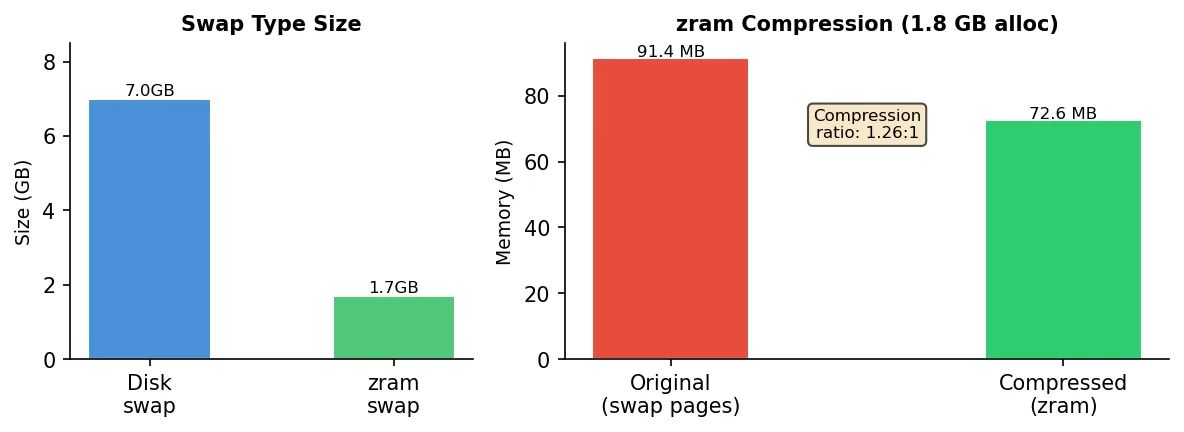
Watch zram in Action
To see the compression working, allocate memory until the system starts swapping. I used a simple Python loop that fills 1.8 GB in 200 MB chunks — this pushes pages into zram:
python3 -c "
import time
blocks=[]
for i in range(9):
    try:
        blocks.append(bytearray(200*1024*1024))
        print(f'Allocated {(i+1)*200}MB')
        time.sleep(0.2)
    except MemoryError:
        break
"After the script finishes (or if it hits the memory limit), check zramctl again. On my runner the output changed from idle zeros to real numbers:
zramctl
NAME       ALGORITHM DISKSIZE   DATA  COMPR  TOTAL STREAMS MOUNTPOINT
/dev/zram0 lzo-rle 1.7G 168.6M 108.3M 111.5M [SWAP]168.6 MB of anonymous pages compressed to 108.3 MB — a ratio of about 1.56:1. The 111.5 MB under TOTAL is the actual RAM the zram device consumes (compressed data plus metadata), meaning I saved roughly 60 MB of physical memory compared to what would have been written to disk. For a 3.3 GB VM that is a small but meaningful bump.
The demo data is synthetic — in real server workloads the load is sustained across many processes, so the compression ratios tend to be even higher (text-heavy pages compress better than bytearrays). Test it with your own app stack: run stress --vm 4 --vm-bytes 512M --timeout 30 if you prefer the stress package, then check zramctl.
Tune vm.swappiness for zram
Because zram lives in RAM, swapping to it does not hit a disk bottleneck. For servers on SSDs or in VMs I raise vm.swappiness so the kernel is less reluctant to swap. The default 60 works, but 100 tells the kernel to prefer swap over dropping file caches:
echo "vm.swappiness = 100" | sudo tee /etc/sysctl.d/90-zram-swap.conf
sudo sysctl -p /etc/sysctl.d/90-zram-swap.confThe result: the kernel aggressively moves inactive memory pages to zram, freeing up physical RAM for active processes and file cache. If you want alerts when swap crosses a threshold, my uptime monitoring script with Telegram alerts fits right in. If you run bare metal with spinning rust, keep swappiness at the default 60 — zram still beats disk swap, but aggressive swap-out on HDDs hurts interactive latency.
My 3.3 GB VM now has 1.7 GB of compressed swap in addition to its existing 7 GB disk swap. The real-world compression ratio of 1.56:1 means I effectively extended memory without adding a single byte of hardware — and zram keeps the write-heavy swap traffic off the SSD, which matters on a hypervisor hosting guests. Zram complements my other homelab services — from a WireGuard VPN server to monitoring stacks. Links are at the top of this post.