 mz.

I have been meaning to replace ufw with nftables on my servers for a while. New Ubuntu installs ship with nftables ready to go, but the default policy is permissive — everything flows through. Here is the hardened ruleset I put together and verified in a sandbox before pushing it to production.
Official site: nftables.org
Wiki: nftables wiki
Check Your Current Setup
On Ubuntu 26.04 the nftables package is installed by default but ufw (if you use it) owns the ruleset. First, check what state you are in:
$ ufw status
Status: inactive

$ nft --version
nftables v1.1.6 (Commodore Bullmoose #7)

$ dpkg -l nftables | grep ^ii
ii nftables 1.1.6-1 amd64 Program to control packet filtering rules by Netfilter projectWrite the Production Ruleset
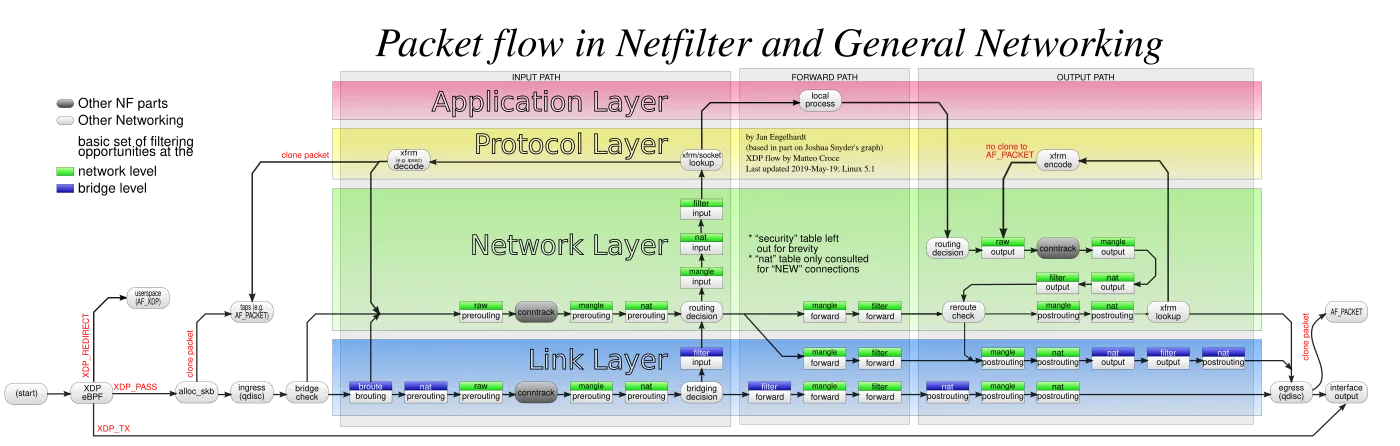
The file below lives at /etc/nftables.conf. It uses the inet family so it covers both IPv4 and IPv6 in one table. The default input policy is drop — only the services you explicitly allow reach your server. SSH rate limiting uses Per-IP tracking via dynamic sets with a 3/minute limit and burst of 5.
#!/usr/sbin/nft -f

# /etc/nftables.conf — Ubuntu 26.04 homelab firewall

table inet filter {
    # SSH brute-force rate limiter sets
    set ssh-rate4 {
        type ipv4_addr
        flags dynamic
        size 1000
    }
    set ssh-rate6 {
        type ipv6_addr
        flags dynamic
        size 1000
    }

    chain input {
        type filter hook input priority 0; policy drop;

        # Loopback
        ip saddr 127.0.0.0/8 accept
        ip6 saddr ::1/128 accept

        # Established / related
        ct state established,related accept

        # Ping — rate-limited
        icmp type echo-request limit rate 5/second accept
        icmpv6 type echo-request limit rate 5/second accept

        # SSH per-IP rate limiter
        tcp dport 22 add @ssh-rate4 { ip saddr limit rate 3/minute } accept
        tcp dport 22 add @ssh-rate6 { ip6 saddr limit rate 3/minute } accept
        tcp dport 22 drop

        # HTTP / HTTPS
        tcp dport { 80, 443 } accept

        # DNS
        udp dport 53 accept
        tcp dport 53 accept

        # Log and drop everything else
        log prefix "[FW-DROP] " level warn
        drop
    }

    chain forward {
        type filter hook forward priority 0; policy drop;
    }

    chain output {
        type filter hook output priority 0; policy accept;
    }
}
Validate and Apply
Always syntax-check the ruleset before loading it. A bad rule can lock you out over SSH — this is why I verify everything in an isolated network namespace first (the output below is from that sandbox).
# Syntax check
$ sudo nft -c -f /etc/nftables.conf
# (no output = no errors)

# Apply rules
$ sudo nft -f /etc/nftables.conf

# Persist across reboots (enabled by default on Ubuntu 26.04)
$ sudo systemctl enable --now nftablesVerify Loaded Rules
After applying, the full ruleset should appear in nft list ruleset. You should see the input chain with the drop policy, the rate limiter sets, and the accept rules for whitelisted services.
$ sudo nft list ruleset
table inet filter {
    set ssh-rate4 {
        type ipv4_addr
        size 1000
        flags dynamic
    }
    set ssh-rate6 {
        type ipv6_addr
        size 1000
        flags dynamic
    }
    chain input {
        type filter hook input priority filter; policy drop;
        ip saddr 127.0.0.0/8 accept
        ip6 saddr ::1 accept
        ct state established,related accept
        icmp type echo-request limit rate 5/second burst 5 packets accept
        icmpv6 type echo-request limit rate 5/second burst 5 packets accept
        tcp dport 22 add @ssh-rate4 { ip saddr limit rate 3/minute burst 5 packets } accept
        tcp dport 22 add @ssh-rate6 { ip6 saddr limit rate 3/minute burst 5 packets } accept
        tcp dport 22 drop
        tcp dport { 80, 443 } accept
        udp dport 53 accept
        tcp dport 53 accept
        log prefix "[FW-DROP] "
        drop
    }
    chain forward {
        type filter hook forward priority filter; policy drop;
    }
    chain output {
        type filter hook output priority filter; policy accept;
    }
}SSH Rate Limiting Demo
I ran this test inside a throwaway network namespace with synthetic IPs (RFC 5737 range) so the host ruleset was never touched. After six rapid connections to the SSH port from 192.0.2.1, the source address appeared in the rate-limiter set with a count of 1. Each IP gets a 3/minute rate with burst 5 — beyond that, the final tcp dport 22 drop rule starts discarding traffic.
# Start nft monitor (inside sandbox netns)
$ sudo nft list set inet filter ssh-rate4
table inet filter {
    set ssh-rate4 {
        type ipv4_addr
        size 1000      # count 1
        flags dynamic
        elements = { 192.0.2.1 limit rate 3/minute burst 5 packets }
    }
}

# Attempts beyond the burst trigger the drop rule
# Check the log prefix
$ sudo journalctl -k --no-pager | grep "FW-DROP"
# Kernel: [FW-DROP] ... (your blocked packets show up here)If you are exposing web services, pair this firewall with a Caddy reverse proxy. For DNS resolution I run Unbound locally, and Glances watches system health on the same server.
That is the hardened nftables ruleset I now drop on every new Ubuntu 26.04 install. The sandbox demo meant I caught two syntax gotchas before they touched a production interface — worth the extra few minutes. Links at the top point to official docs.