 mz.

A return code = -13 ate a good chunk of my afternoon last week. The server config was perfect, the password was right, and the mount kept failing with a message about read-only. The crime scene was the client: the kernel filesystem driver never reads a credentials file, a small userspace helper does. Anyway, the lab now runs a clean Samba share, so here is the whole setup on Ubuntu 26.04, gotchas included. All output below is captured from a real sandbox; the user marina, the password and the server address 192.0.2.10 (RFC 5737 TEST-NET) are synthetic demo values.
Official site: https://www.samba.org
GitHub: https://github.com/samba-team/samba
What you need
- A server running Ubuntu 26.04 (Samba 4.23 ships in the repo)
- A Linux group for the team that shares the files
- Admin SSH access, ideally already locked down – see hardening OpenSSH on Ubuntu 26.04
1. Install Samba
Ubuntu splits Samba into the core server package and the command line client. The smbclient tool pays for itself immediately, so install both.
sudo apt update
sudo apt install -y samba smbclient
smbd -VVersion 4.23.6-Ubuntu-4.23.6+dfsg-1ubuntu2.2Ubuntu 26.04 also ships a tuned default /etc/samba/smb.conf, and it already sets disable netbios = yes. That means clients reach the server by IP or DNS over plain TCP 445, and you can ignore nmbd entirely unless you need old NetBIOS name resolution.
2. Create the group and service account
A share should be owned by a group, never by one person's personal account. I create a dedicated group and a login-disabled account for scripted or human access, then add everyone who needs the share to that group.
sudo groupadd projectx
sudo useradd -m -G projectx -s /usr/sbin/nologin marina
id marinauid=1003(marina) gid=1004(marina) groups=1004(marina),1003(projectx)Then set the SMB password. Samba keeps its own passdb (tdbsam by default), separate from the Linux shadow file, so smbpasswd is a required step. The -s flag reads the password from stdin, which keeps it out of your shell history.
printf 'Pr0j3ctX!2026\nPr0j3ctX!2026\n' | sudo smbpasswd -a -s marina
sudo pdbedit -L -v | head -6Added user marina.
---------------
Unix username: marina
NT username:
Account Flags: [U ]
User SID: S-1-5-21-2001019014-1429219876-3572968067-10003. Create the share directory
sudo mkdir -p /srv/projectx
sudo chown root:projectx /srv/projectx
sudo chmod 2770 /srv/projectx
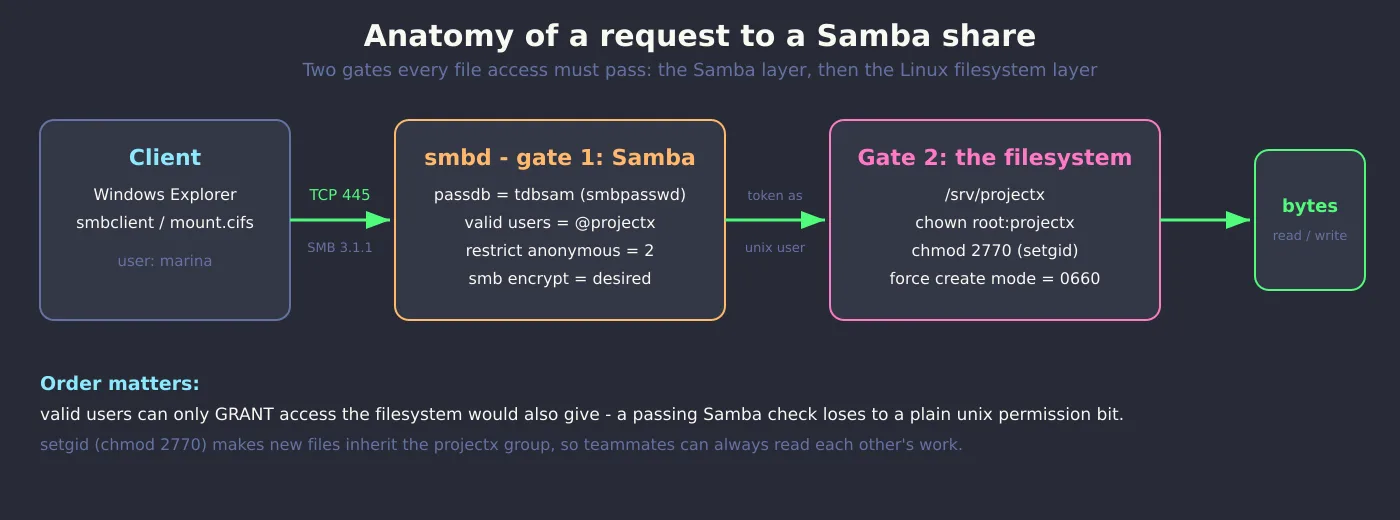
ls -ld /srv/projectxdrwxrws--- 2 root projectx 4096 Nov 25 03:06 /srv/projectxThe 2 in 2770 is the setgid bit – you can already see it as the s in the group execute column. Without it, files land owned by each user's primary group and teammates cannot read each other's uploads. With it, every new file inherits projectx as its group. This single bit is the difference between a team share and a pile of broken permissions.
4. Define the share in smb.conf
Append this block to /etc/samba/smb.conf. Every line does real work: valid users rejects everyone outside the group at the SMB layer, and the force modes guarantee new files land 0660 and new directories 2770 no matter what the client requests.
[projectx]
   comment = Project X team share
   path = /srv/projectx
   browseable = yes
   read only = no
   valid users = @projectx
   create mask = 0660
   force create mode = 0660
   directory mask = 2770
   force directory mode = 2770
   inherit permissions = yes
smb encrypt = desiredAnd these three lines in the [global] section, to stop anonymous chatter dead:
map to guest = never
restrict anonymous = 2
server min protocol = SMB3_02Before starting anything, let the config validate itself.
testparm -s /etc/samba/smb.conf 2>/dev/null | grep -A11 '\[projectx\]'[projectx]
comment = Project X team share
create mask = 0660
directory mask = 02770
force create mode = 0660
force directory mode = 02770
inherit permissions = Yes
path = /srv/projectx
read only = No
server smb encrypt = desired
valid users = @projectx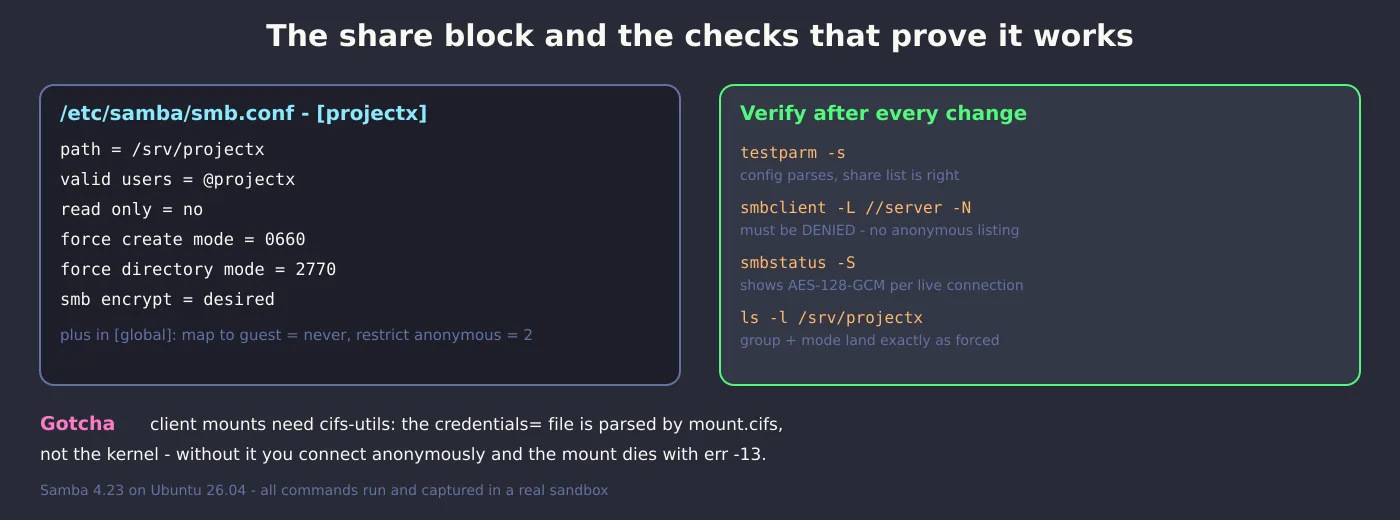
5. Open the firewall
Samba speaks SMB over TCP 445. With NetBIOS disabled in the Ubuntu default config, that is the only port the file service needs.
sudo ufw allow 445/tcp
sudo ufw reloadIf your server runs nftables instead of ufw, add the 445 accept line to the input chain – my nftables firewall setup for Ubuntu 26.04 covers exactly where it goes.
6. Start the service and prove it locks down
sudo systemctl enable --now smbd
systemctl is-active smbd
ss -tlnp | grep -E ':(139|445)'active
LISTEN 0 50 0.0.0.0:445 0.0.0.0:* users:(("smbd",pid=4026781,fd=29))
LISTEN 0 50 [::]:445 [::]:* users:(("smbd",pid=4026781,fd=27))Now the fun part. Ask the server for its share list anonymously – it must say no.
smbclient -L //192.0.2.10 -NAnonymous login successful
tree connect failed: NT_STATUS_ACCESS_DENIEDThe server opens an anonymous session but refuses to connect it to any tree, which is restrict anonymous = 2 plus map to guest = never doing their job. As marina, the same share is wide open, and a user outside the group gets the same ACCESS_DENIED even knowing the share name. I confirmed that by adding a second test account and watching its tree connect fail.
smbclient //192.0.2.10/projectx -U marina -c 'put /tmp/notes.txt notes.txt; ls' . D 0 Wed Nov 25 03:08:25 2026
team-a D 0 Wed Nov 25 03:08:25 2026
notes.txt A 14 Wed Nov 25 03:08:25 2026ls -l /srv/projectx-rwxrw----+ 1 marina projectx 14 Nov 25 03:08 notes.txt
drwxrws---+ 2 marina projectx 4096 Nov 25 03:08 team-aThat second block is why I set force modes: the uploaded file arrived as marina:projectx at 0660 with the setgid directory surviving, exactly as configured. And smbstatus -S shows AES-128-GCM in the Encryption column for the live connection, proof the per-share smb encrypt line took effect.
7. Mount it on a Linux client
sudo mkdir -p /mnt/projectx
printf "username=marina\npassword=Pr0j3ctX!2026\n" | sudo -S -p  tee /root/.smbcreds >/dev/null
sudo chmod 600 /root/.smbcreds
sudo mount -t cifs //192.0.2.10/projectx /mnt/projectx \
  -o credentials=/root/.smbcreds,vers=3.1.1,uid=1003,gid=1003,file_mode=0660,dir_mode=0770,_netdev
df -hT /mnt/projectx//192.0.2.10/projectx cifs 30G 21G 9.3G 69% /mnt/projectxThe two failures that cost me time
If your mount dies with this exact pair of messages, the server config is not the problem:
mount: /mnt/projectx: cannot mount //192.0.2.10/projectx read-only.
CIFS: VFS: cifs_mount failed w/return code = -13Passing credentials in a file is a mount.cifs feature, not a kernel feature. On a minimal client without the cifs-utils package, mount(8) hands your credentials= string to the kernel untouched, the kernel does not know that option, and the session comes up anonymous against a server that rejects guests. One line fixes it: sudo apt install cifs-utils. I wasted a suspicious amount of time reading Samba auth logs that never had an error in them.
The second failure is subtler. With server min protocol = SMB3_02 on the server, a client that pins vers=3.0 gets rejected:
CIFS: VFS: \\192.0.2.10 Dialect not supported by server.
CIFS: VFS: cifs_mount failed w/return code = -95vers=3.1.1 matches the server's floor. Do not forget _netdev either – it tells systemd this mount depends on networking, so boot does not stall retrying a share that is not reachable yet.
Make it survive reboots
For an automatic mount at boot, this is the /etc/fstab line I tested with mount -a -T /etc/fstab --fake -v before trusting it:
//192.0.2.10/projectx /mnt/projectx cifs credentials=/root/.smbcreds,vers=3.1.1,uid=1003,gid=1003,file_mode=0660,dir_mode=0770,_netdev,x-systemd.automount 0 0The x-systemd.automount option means the CIFS session is only opened on first access, so a dead file server no longer wedges your boot for the timeout duration.
That is the whole share: two layers of permission checks, encryption on the wire, anonymous access denied on the front porch. If the clients are all Linux, you may honestly want an NFS server instead, but the moment Windows laptops join the party, Samba is the protocol that speaks their language.