 mz.

While testing this post in a throwaway Ubuntu container, unattended-upgrades silently patched an actual heap overflow in glibc (changelog: resolute-security). I did not notice until I checked the log . which is exactly the outcome you want on a server you SSH into once a month. The official Ubuntu documentation is at help.ubuntu.com/community/Unattended-Upgrades and the source lives on Launchpad.
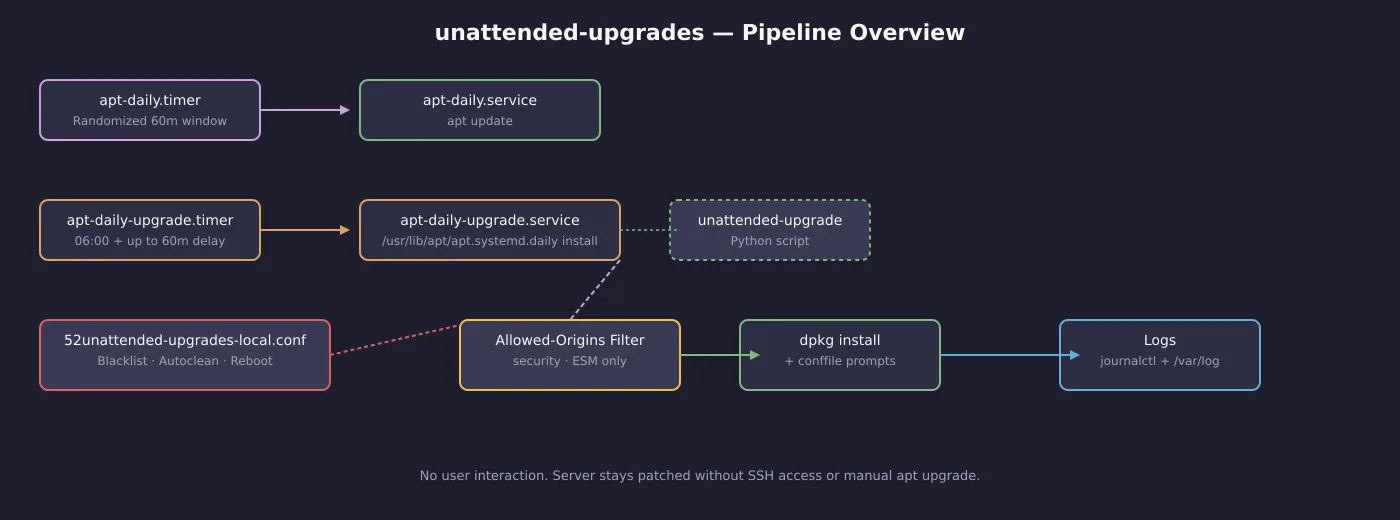
unattended-upgrades is a Python script from Canonical that runs daily, checks the package index for updates from configured origins (security pockets only, by default), and installs them. It is the engine behind apt-daily-upgrade.service and ships as the default automatic-update mechanism on Ubuntu since 18.04 LTS.
Install it with a single command, and two config files land in /etc/apt/apt.conf.d/:
$ sudo apt install unattended-upgrades
...
Setting up unattended-upgrades (2.12ubuntu9) ...
Creating config file /etc/apt/apt.conf.d/20auto-upgrades with new version
Creating config file /etc/apt/apt.conf.d/50unattended-upgrades with new version
Created symlink '/etc/systemd/system/multi-user.target.wants/unattended-upgrades.service'
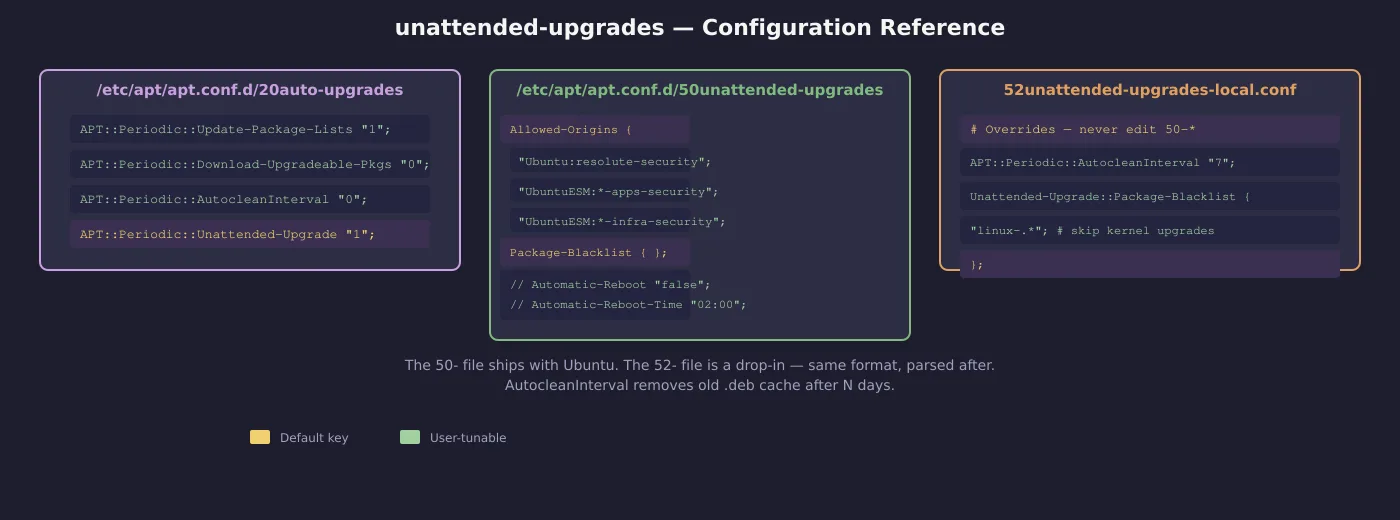
The first file, 20auto-upgrades, controls the frequency:
$ cat /etc/apt/apt.conf.d/20auto-upgrades
APT::Periodic::Update-Package-Lists "1";
APT::Periodic::Unattended-Upgrade "1";
Update-Package-Lists "1" means apt update runs daily (the apt-daily.timer takes care of that). Unattended-Upgrade "1" enables the upgrade pass itself . no updates without it.
The second file, 50unattended-upgrades, defines which package origins are allowed. The default restricts to security-only origins:
$ grep -vE '^\s*(//|$)' /etc/apt/apt.conf.d/50unattended-upgrades | head -10
Unattended-Upgrade::Allowed-Origins {
    "${distro_id}:${distro_codename}";
    "${distro_id}:${distro_codename}-security";
    "${distro_id}ESMApps:${distro_codename}-apps-security";
    "${distro_id}ESM:${distro_codename}-infra-security";
};
Unattended-Upgrade::Package-Blacklist {
};
Unattended-Upgrade::DevRelease "auto";
Only Ubuntu:resolute-security (the codename for 26.04), UbuntuESMApps:resolute-apps-security, and UbuntuESM:resolute-infra-security packages are permitted. Regular resolute-updates (bugfix-only) packages are ignored . the script matches by apt repository origin, not by version number.
Before trusting the mechanism on a production box, verify it with a dry run:
$ unattended-upgrade --dry-run --debug 2>&1 | tail -8
Applying pinning: PkgFilePin(id=4, priority=-32768)
left to upgrade set()
All upgrades installed
kernel_pkgs_remove_success: True
pkg_install_success: True
InstCount=0 DelCount=0 BrokenCount=0
upgrade result: True All upgrades installed
On a minimal 26.04 container, the real (non-dry) run found four pending updates from resolute-security:
$ unattended-upgrade
...
2026-11-26 03:04:35,643 INFO Packages that will be upgraded:
    libc-bin libc-gconv-modules-extra libc6 perl-base
2026-11-26 03:04:35,644 INFO Writing dpkg log to ...
2026-11-26 03:04:50,200 INFO All upgrades installed
The upgrade step runs from apt-daily-upgrade.timer. Check the schedule with systemctl list-timers:
$ systemctl list-timers --all | grep apt-daily
Thu 2026-11-26 06:11:42 UTC  apt-daily-upgrade.timer  apt-daily-upgrade.service
Thu 2026-11-26 16:58:41 UTC  apt-daily.timer          apt-daily.service
The timer definition tells the full story:
$ systemctl cat apt-daily-upgrade.timer | head -10
[Unit]
Description=Daily apt upgrade and clean activities
After=apt-daily.timer

[Timer]
OnCalendar=*-*-* 6:00
RandomizedDelaySec=60m
Persistent=true

[Install]
WantedBy=timers.target
Fires daily at 06:00 with up to 60 minutes of randomized delay to spread load across the fleet. Persistent=true catches up if the machine was powered off. Compare this with the fixed-interval behaviour of cron . I measured the jitter gap in cron vs systemd timers.
The override file 52unattended-upgrades-local.conf sits in the same apt.conf.d/ directory and is parsed after 50-. Use it to blacklist packages or enable autoclean . never edit the shipped 50-* directly since package upgrades overwrite it:
$ cat /etc/apt/apt.conf.d/52unattended-upgrades-local.conf
Unattended-Upgrade::Package-Blacklist {
    "linux-.*";      # skip kernel upgrades
};
APT::Periodic::AutocleanInterval "7";
Uncomment Automatic-Reboot "true" and set Automatic-Reboot-Time "02:00" in 50unattended-upgrades if you want the server to reboot after a kernel upgrade. Without it, the new kernel stays dormant until the next manual reboot.
After a run, two log files sit in /var/log/unattended-upgrades/. The main log shows the origins matched and every package action:
$ ls /var/log/unattended-upgrades/
unattended-upgrades-dpkg.log
unattended-upgrades.log

$ head -6 /var/log/unattended-upgrades/unattended-upgrades.log
2026-11-26 03:03:30,002 DEBUG loading plugins from [...]
2026-11-26 03:03:30,003 INFO Checking if system is running on battery ...
2026-11-26 03:03:30,005 INFO Starting unattended upgrades script
2026-11-26 03:03:30,006 INFO Allowed origins are:
    o=Ubuntu,a=resolute o=Ubuntu,a=resolute-security
    o=UbuntuESMApps,a=resolute-apps-security
    o=UbuntuESM,a=resolute-infra-security
2026-11-26 03:03:30,006 INFO Initial blacklist:
The systemd journal also records the service lifecycle. The snippet below shows a real run on my runner server:
$ journalctl -u apt-daily-upgrade.service -n 6 --output=short-iso
2026-11-25T06:59:54+00:00 Starting apt-daily-upgrade.service ...
2026-11-25T07:00:24+00:00 E: Sub-process nm-online returned an error code (1)
2026-11-25T07:01:14+00:00 Deactivated successfully.
2026-11-25T07:01:14+00:00 Finished apt-daily-upgrade.service
                         (50.576s CPU, 904.5M memory peak)
The nm-online error at the start looks alarming but is harmless on servers without NetworkManager . apt-helper probes it for connectivity and moves on.
Not in the mood to wait for the timer? Fire it off manually from either angle:
# Trigger via systemd
$ sudo systemctl start apt-daily-upgrade.service

# Or run the script directly
$ sudo unattended-upgrade -v
unattended-upgrades is the single most effective ten-minute setup for any Ubuntu server. Combined with an nftables firewall and OpenSSH hardening, your pet box stays patched between login sessions without manual apt upgrade cycles.