 mz.

I trusted cron to fire a snapshot job exactly on the minute for years. Last month a “simultaneous” cleanup script kept landing two seconds late and racing the thing it was meant to precede. So I wired both schedulers to the same trivial probe on one VM and timestamped every fire. Here is what the clock actually says.
References: Ubuntu cron(8) manpage • systemd.time(7) on freedesktop.org
Requirements
- Ubuntu 24.04 or 26.04 (systemd present, cron installed via
apt install cron) - root or a user able to edit crontabs and write unit files
- ten quiet minutes where the box does nothing else
Method
One Ubuntu 26.04 VM (kernel 7.0.0-38-generic), nothing else scheduled, one job per scheduler, both due on every minute boundary. The payload is deliberately trivial – reading /etc/hostname – because the only thing worth measuring in a scheduler race is the gap between scheduled and started. Timestamps come from date +%s.%N inside the probe itself, so they include fork and exec of the whole chain. Repeatable on any box: the script below is the whole lab.
#!/bin/sh
D=/tmp/cronvsys
s=$(date +%s.%N)
cat /etc/hostname >/dev/null
e=$(date +%s.%N)
v=$(awk '{print $14+$16, $15+$17}' /proc/self/stat)
printf "%s %s %s %s\n" "$1" "$s" "$e" "$v" >> "$D/runs.txt"The cron side is one line dropped into root’s crontab:
(crontab -l 2>/dev/null; echo "* * * * * /bin/sh /tmp/cronvsys/logrun.sh cron") | crontab -
grep CRON /var/log/syslog | tailThe systemd side is a two-line timer and a oneshot service. Note AccuracySec=1us: the default lets systemd wake up anywhere inside the minute to batch timer fires and save power, which would be unfair to cron here – I want the raw, eager number on both sides.
# /etc/systemd/system/cv-timer.timer
[Timer]
OnCalendar=*-*-* *:*:00
AccuracySec=1us
Unit=cv-svc.service

# /etc/systemd/system/cv-svc.service
[Service]
Type=oneshot
ExecStart=/bin/sh /tmp/cronvsys/logrun.sh systemdsystemctl daemon-reload
systemctl start cv-timer.timer
systemctl list-timers cv-timer.timerThe raw fires
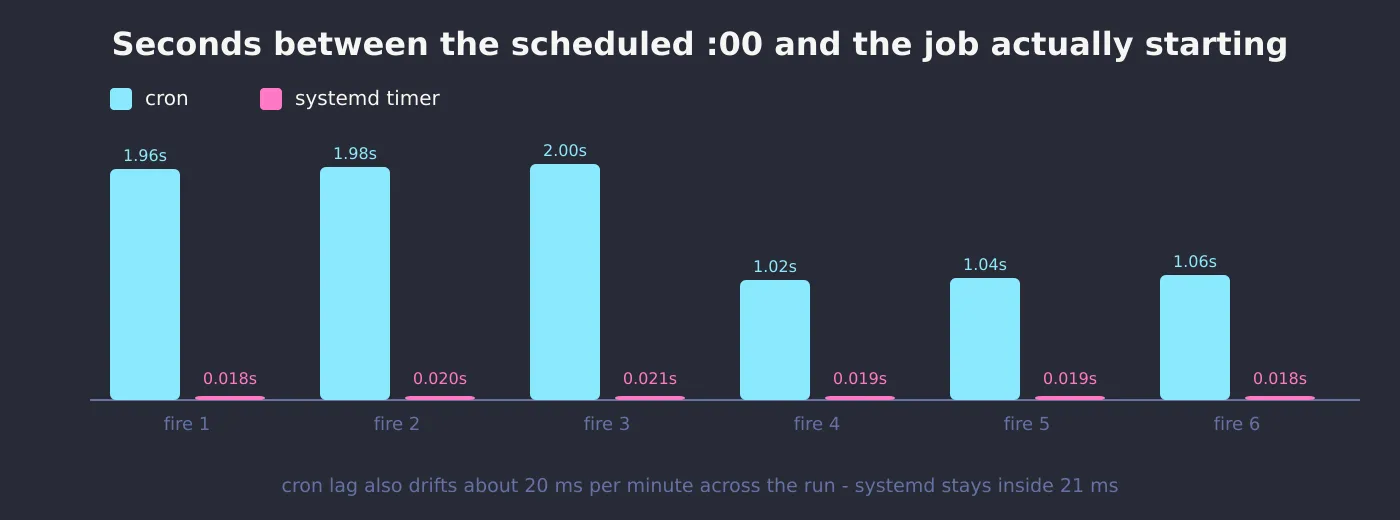
First fires, straight from runs.txt. Columns: label, start epoch, end epoch, user+system jiffies. Look at the sub-second part of the start column:
cron 1794805741.955748288 1794805741.962492951 0 0
cron 1794805801.976693168 1794805801.983483328 0 0
cron 1794805861.997196135 1794805862.003886601 0 0
cron 1794805921.018209577 1794805921.025369690 0 0
cron 1794805981.039085026 1794805981.045676813 0 0
cron 1794806041.059789961 1794806041.066204583 0 0systemd 1794805740.018191977 1794805740.026179147 0 0
systemd 1794805800.019504203 1794805800.027179594 0 0
systemd 1794805860.020929234 1794805860.027885949 0 0
systemd 1794805920.018816775 1794805920.025508954 0 0
systemd 1794805980.019473720 1794805980.025754556 0 0
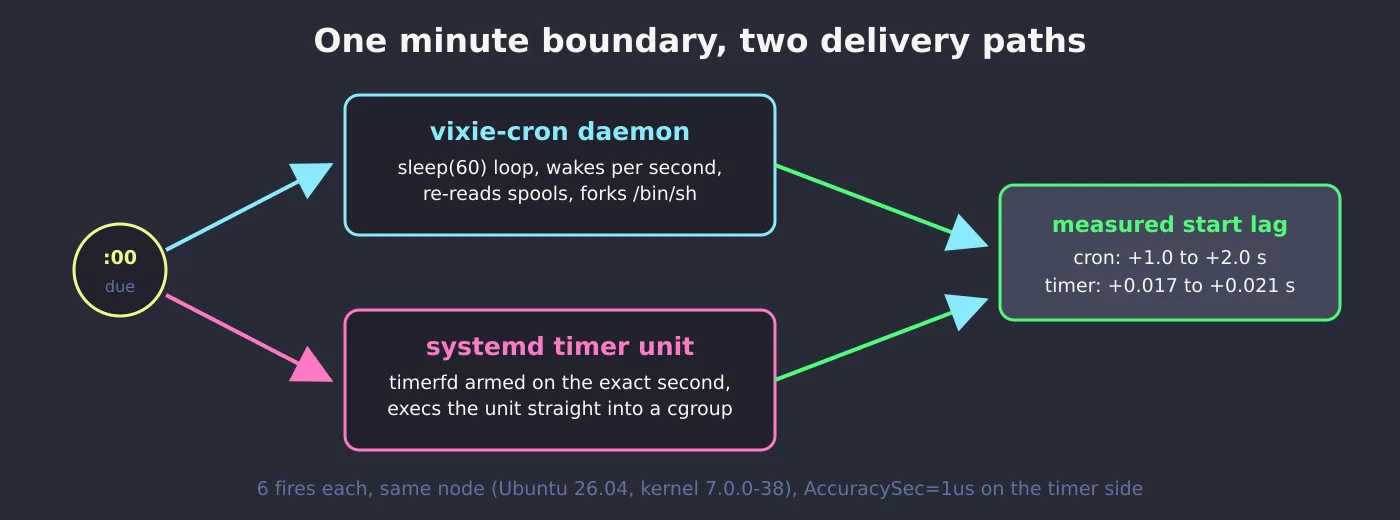
systemd 1794806040.017899570 1794806040.024510240 0 0Read it carefully: cron’s starts land at .955, .976, .997 of the minute… then reset to .018, .039, .059 a minute into the run. That is the daemon’s 1-second wake loop drifting about 20 ms per fire until it crosses a boundary and jumps back. The timer rows start 17 to 21 milliseconds after :00 and never move.
Side by side
| Metric | vixie-cron | systemd timer |
|---|---|---|
| Mean start lag after the scheduled :00 | +1.508 s | +0.018 s |
| Lag range over 6 fires | +1.018 to +1.997 s | +0.017 to +0.021 s |
| Probe wall time per run | 0.0067 s | 0.0069 s |
| CPU per run | under 0.01 s | under 0.01 s |
| Resident cost when idle | ~2 KB cron daemon, always on | zero extra (PID 1 already runs) |
| Works in a plain container | yes, everywhere | needs a systemd init |
| Log of every fire | syslog, if configured | journalctl -u, for free |
The annoying bits, on both sides
Cron won me on ergonomics for a simple edit: crontab -e, done, no daemon-reload, and the identical syntax works on the one-off container someone spun up last week. It also keeps a per-minute spool reload I did not know about until grep CRON /var/log/syslog flooded. systemd timers are the better citizen on a systemd host – journalctl -u cv-svc.service tells me every exit code without configuring anything, and Persistent=true catches up fires missed during downtime, which cron quietly never does. But a typo in a unit file needs daemon-reload before it bites, and on minimal containers there is no PID 1 to talk to.
If you go timer-side, pair it with per-service resource limits so the same cgroup that schedules the job also caps it – that combination is the real reason I moved housekeeping scripts off crontab.
Verdict
For anything that must touch the wall clock exactly – race-a-rotation jobs, cache flushes at :00, log handoffs to scripts like the one in finding logs logrotate misses – systemd timers win clean: 18 ms mean versus 1.5 s, and no per-minute drift. Choose cron anyway when the box is a container without systemd, when your team edits crontab -e from muscle memory, or when the job only cares about roughly-every-minute and not the boundary itself. Two seconds of slack was never the problem; not knowing it was there, was. Related reading from this bench lane: gzip vs zstd, with pigz.