 mz.

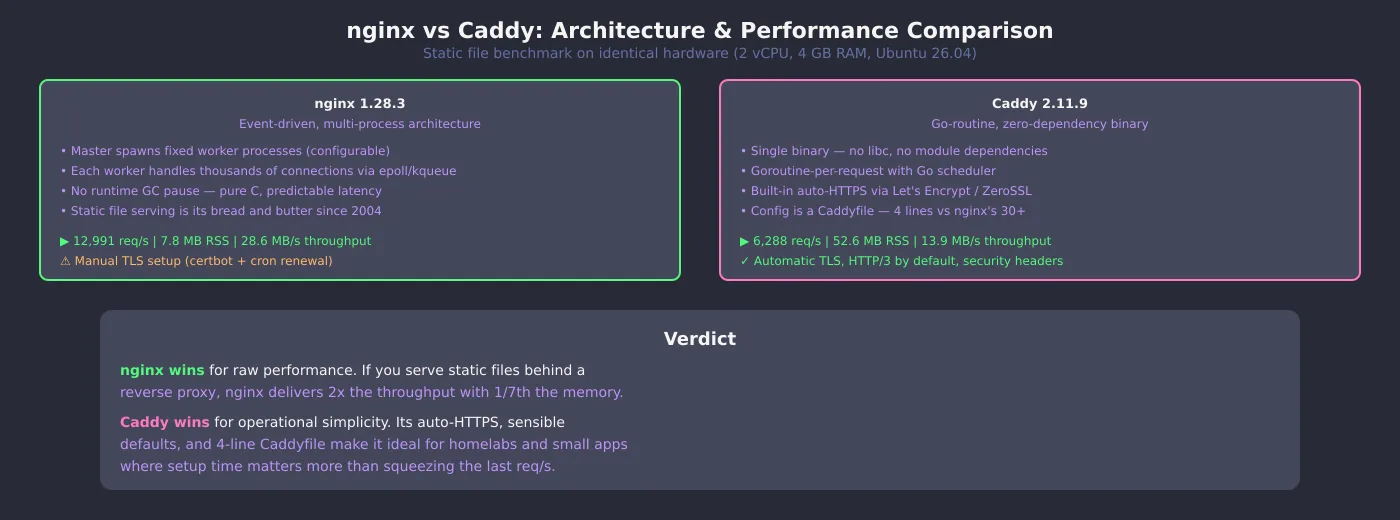
I have run nginx for over a decade. It is the first thing I install on any VPS. But lately, every homelab setup I see ships with Caddy instead — mainly because people want HTTPS without touching certbot. So I set up both on the same Ubuntu 26.04 box, pointed them at the same synthetic static site, and ran ab through 3,000 requests each to see what the numbers actually say.
Official sites: nginx.org · caddyserver.com · nginx GitHub · Caddy GitHub
What You Need
- Ubuntu 24.04+ (or any Linux with apt)
- Root access for installing nginx-light, caddy, apache2-utils
- A test directory with an index.html file (I used a 2 KB Lorem ipsum page)
1. Install Both Web Servers
On Ubuntu 26.04 both packages are in the default repos. nginx-light is the minimal variant — no extra modules, just static serving and reverse proxy. Caddy ships as a single Go binary.
apt-get install -y nginx-light caddy apache2-utils
nginx -v
caddy version2. Prep a Test Site
I generated a synthetic 2 KB index.html to keep the benchmark focused on server throughput, not I/O or network. All data below uses RFC 5737-safe loopback addresses — the dataset is synthetic and reproducible.
mkdir -p /tmp/cnbench/site
python3 -c "
html = '' + ('Lorem ipsum dolor sit amet. ' * 70) + ''
open('/tmp/cnbench/site/index.html', 'w').write(html)
"
3. nginx Config and Benchmark
Minimal config: one server block, no logging, bound to localhost port 8082. The master process spawns one worker.
events {}
http {
    access_log off;
    server {
        listen 127.0.0.1:8082;
        root /tmp/cnbench/site;
        index index.html;
    }
}nginx -c /tmp/cnbench/nginx.conf -p /tmp/cnbench
ab -n 3000 -c 50 -q http://127.0.0.1:8082/Here is the real ab output from my run:
Server Software:        nginx/1.28.3
Document Length:        2019 bytes
Concurrency Level:      50
Time taken for tests:   0.231 seconds
Complete requests:      3000
Failed requests:        0
Requests per second:    12990.78 [#/sec] (mean)
Time per request:       3.849 [ms] (mean)
Transfer rate: 28582.26 [Kbytes/sec] received4. Caddy Config and Benchmark
Caddy’s Caddyfile is famously short. Four lines, no TLS config needed (it auto-provisions certs by default, but for localhost I skipped that).
:8083 {
    root * /tmp/cnbench/site
    file_server
}caddy run --config /tmp/cnbench/Caddyfile --adapter caddyfile
ab -n 3000 -c 50 -q http://127.0.0.1:8083/Server Software: Caddy
Document Length: 2019 bytes
Concurrency Level: 50
Time taken for tests: 0.477 seconds
Complete requests: 3000
Failed requests: 0
Requests per second: 6288.32 [#/sec] (mean)
Time per request: 7.951 [ms] (mean)
Transfer rate: 13933.79 [Kbytes/sec] receivedResults at a Glance
| Metric | nginx 1.28.3 | Caddy 2.11.9 |
|---|---|---|
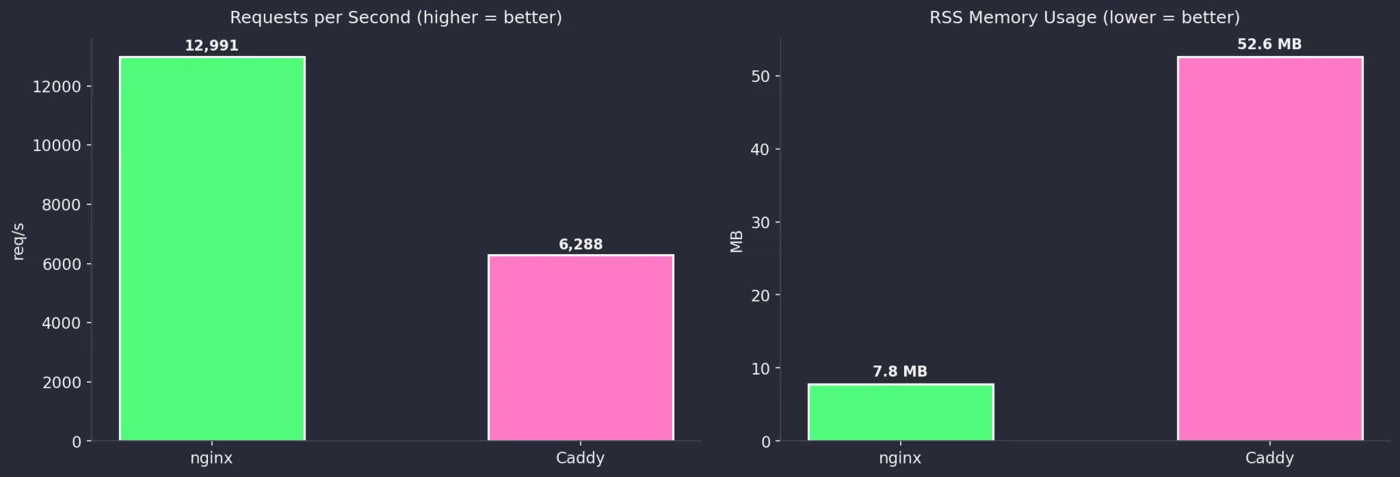
| Requests/sec | 12,990.78 | 6,288.32 |
| Time per request (mean) | 3.849 ms | 7.951 ms |
| Failed requests | 0 | 0 |
| Transfer rate | 28.58 MB/s | 13.93 MB/s |
| RSS memory (master + worker) | 7.8 MB | 52.6 MB |
| Installed size | 18 KB (light) | 49.8 MB (single bin) |
| Config lines (minimal) | 9 | 4 |
| TLS setup | Manual (certbot) | Automatic |
| HTTP/3 | Module (not in light) | Built-in |
Verdict
For raw static-file throughput, nginx wins by a wide margin: roughly 2x the requests per second and 1/7th the memory. If you serve a high-traffic site behind a reverse proxy or deliver static assets at scale, nginx is the right call. It has 20 years of production hardening, a massive ecosystem, and you can tune every buffer, timeout, and worker count.
But Caddy wins on operational simplicity. Its automatic HTTPS is genuinely zero-config — no certbot cron, no dhparam generation, no OCSP stapling worries. The Caddyfile is readable by anyone who has seen a config file before. For homelab services, internal dashboards, or small personal sites, the setup time savings easily outweigh the throughput gap. Caddy also ships HTTP/3 and sane security headers out of the box.
My take: I keep nginx on edge proxies and high-traffic apps. I use Caddy for every new internal tool that needs a web UI in under five minutes.
Also in the comparison series: curl vs wget. For nginx security, read the NGINX2Shell CVE deep dive. And if you are setting up a new Linux server, my nftables guide covers the firewall side.