 mz.

wget silently restarted a broken download from zero. curl refused to resume it at all. Same server, same 120 MB file, two completely different failure modes. That disagreement is the whole reason I ran this benchmark.
Official projects: curl.se and curl on GitHub, GNU Wget. Both shipped on my Ubuntu box, nothing installed.
The setup
One python http.server on 127.0.0.1 serving a seeded, deterministic 120 MB file (60 repeats of a 2 MB block generated with random.Random(1234)), plus twenty 128 KB files and a small nested directory tree. All synthetic data, and no RFC-5737 addresses needed because everything stays on loopback. Every download is verified against the sha256 of the source. Timings are wall clock, 3 runs, median reported.
curl --version | head -1
# curl 8.18.0 (x86_64-pc-linux-gnu)
wget --version | head -1
# GNU Wget 1.25.0 built on linux-gnu.Test 1: the plain download
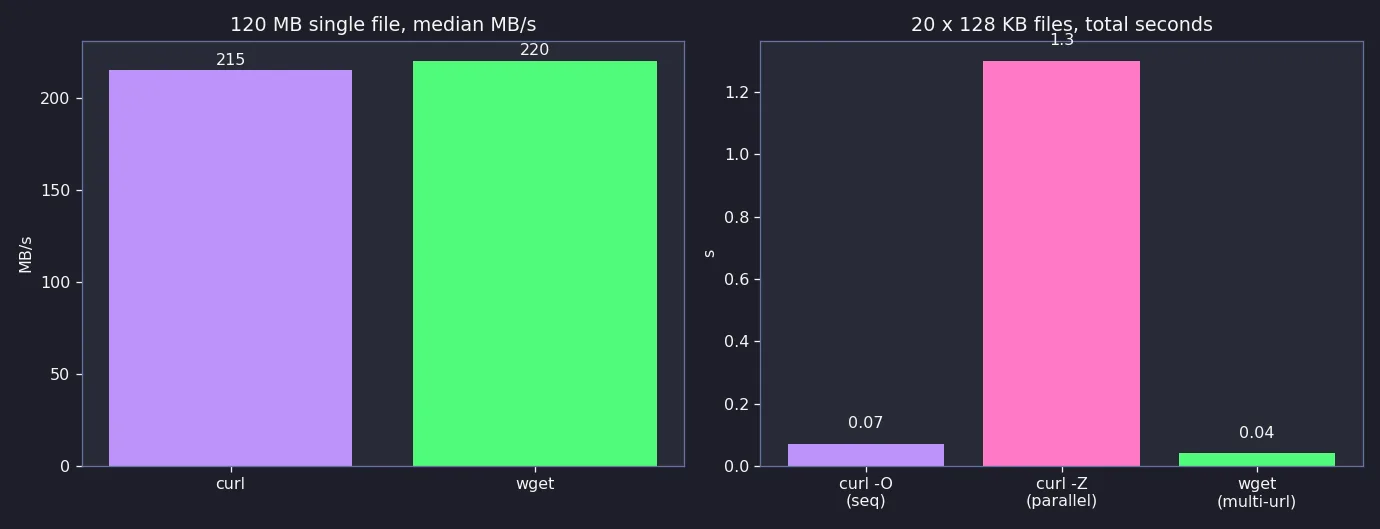
Boring, and that is the point: both saturate loopback and the CPU inside python http.server. curl runs: 0.64 s, 0.54 s, 0.56 s. wget runs: 0.47 s, 0.55 s, 0.65 s. Medians below. Neither tool is meaningfully faster at moving bytes.
curl -fsS -o big.bin http://127.0.0.1:8099/big.bin
# median run: 0.56 s, 215 MB/s, sha256 match
wget -q -O big.bin http://127.0.0.1:8099/big.bin
# median run: 0.55 s, 220 MB/s, sha256 matchTest 2: twenty files, one command
Both tools take a URL list. wget did 20 files in 0.04 s, sequential curl -O in 0.07 s. The honest surprise: curl -Z (parallel transfers) took 1.3 s, several times slower on loopback. Connection setup overhead with no latency to hide. -Z earns its keep on WAN links, not LAN ones.
curl -sS -O http://127.0.0.1:8099/f00.bin -O http://127.0.0.1:8099/f01.bin  # ... 20 urls
# 20 files in 0.07 s
curl -sZ -O http://127.0.0.1:8099/f00.bin -O http://127.0.0.1:8099/f01.bin  # same 20 urls, -Z
# 20 files in 1.3 s (slower here)
wget -q http://127.0.0.1:8099/f00.bin http://127.0.0.1:8099/f01.bin  # ... 20 urls
# 20 files in 0.04 sTest 3: resume a killed download
Both rate limited to 40M, killed after 1.2 s, then resumed. Against the plain python server, which ignores Range headers, the tools diverge hard: curl aborts with error 33 and leaves the file partial. wget shrugs and re-downloads the whole 120 MB in 2.92 s. Strict beats silent here: wget’s sha256 ends up correct, but you paid full bandwidth to get there.
# server WITHOUT Range support (python -m http.server)
curl -fsS --limit-rate 40M -C - -o big.bin http://127.0.0.1:8099/big.bin
# curl: (33) HTTP server doesn't seem to support byte ranges -> rc 33, file left at 62.9 MB
wget -q --limit-rate=40M -c -O big.bin http://127.0.0.1:8099/big.bin
# restarts from 0, 2.92 s, sha256 ok, 120 MB re-sent
# same tests against a Range-aware server:
# curl -C - resumed from 62.9 MB in 1.11 s, sha256 match
# wget -c resumed from 56.1 MB in 1.57 s, sha256 matchDebug note: the harness log filled with server-side BrokenPipeError tracebacks each time a download got killed. That was the kill working, not a bug. It also proved a point: curl notices truncation and fails loudly where wget papers over it.
Test 4: mirror a directory tree
wget -r -np -nH grabbed the nested tree in 0.02 s with one flag, though it also mirrored the autoindex index.html files, tidy those up later. curl has no recursive mode at all; a small parse-and-recurse script took 0.1 s. Fine at this scale, more code to own.
wget -q -r -np -nH http://127.0.0.1:8099/tree/
# got: tree/a.txt, tree/sub1/b.txt, tree/sub1/sub2/c.txt (+ index.html per dir)
# curl equivalent: loop over parsed index pages, recurse, -o each path
curl -fsS http://127.0.0.1:8099/tree/ | grep -o 'href="[^"]*"'
# 3 files in 0.1 s via the crawl scriptThe comparison
| Test | curl 8.18.0 | wget 1.25.0 |
|---|---|---|
| 120 MB single file | 0.56 s (215 MB/s) | 0.55 s (220 MB/s) |
| 20 x 128 KB files, one command | 0.07 s (-O sequential) | 0.04 s (multi-URL) |
| Resume, server supports Range | 1.11 s from 62.9 MB, sha256 match | 1.57 s from 56.1 MB, sha256 match |
| Resume, server ignores Range | fails with curl error 33, file left partial | silently restarts from 0, wastes bytes |
| Recursive mirror of a tree | no flag, needs a crawl script | one flag (-r -np -nH), 0.02 s |
| Auth, headers, POST, API work | first class (-H, -u, -d, -w) | basic, awkward |
| Protocols | HTTP/1.1, HTTP/2, HTTP/3, FTP, SFTP and more | HTTP, HTTPS, FTP |
Verdict
For scripts that hit APIs, auth, headers or status codes, curl wins, and it is not close: one flag each for -H, -u, -d and -w, plus Range strictness that fails loudly instead of quietly re-billing your bandwidth. Keep wget for mirroring: if you are pulling a directory tree or a wall of static files onto a box, -r -np is still one flag instead of twenty lines of index parsing you will rewrite every time.
If you want a web server to point these tools at, see the Caddy reverse proxy install, and for the log side of the same servers there is Nginx access log analysis with Bash and Python plus a TLS expiry checker built entirely on curl.