 mz.

I have run restic for three years and never once opened a borg repository until this week. Both claim encryption, deduplication and snapshot retention, and both are a single install away, so the usual forum argument settles nothing. I put them on the same 116 MB of data on the same box and timed every step.
restic: restic.net and github.com/restic/restic
borg: borgbackup.readthedocs.io and github.com/borgbackup/borg
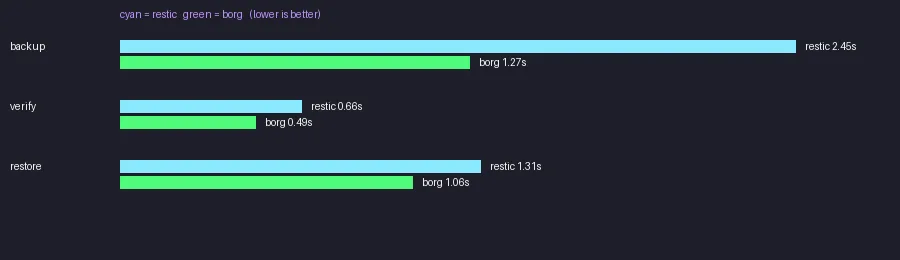
What I actually measured
Test box: 2 vCPU, 3.3 GB RAM, Debian-family userspace. restic 0.18.1 (go1.25.0) and borg 1.4.4, both straight from apt, no tuning on either side. The dataset is 30 files of random bytes with a skewed size mix (mostly 4 MB, four at 5 MB, one at 10 MB), 116 MB in total, generated with os.urandom and a fixed random seed so anyone can rerun it.
Random bytes are deliberate. Compressible data flatters whichever tool compresses better, and you would spend the rest of the post arguing about that instead of backup speed. With incompressible data borg reported 121.00 MB original against 121.00 MB compressed, so the comparison stays about chunking, hashing and disk I/O. The data is synthetic, there is no client traffic here, and the timings include process startup, which matters at this size.
Requirements
- Any Linux box with apt, Ubuntu 24.04 or 26.04 is fine
- root or sudo, both tools want to read the whole tree
- About 500 MB free for two repositories plus two restore targets
- Nothing else, both tools work against a local directory
Step 1: build a dataset worth timing
This is the exact seeding code that ran, lifted from the benchmark script. Thirty files, sizes drawn from a weighted list, content from os.urandom.
import os, random, subprocess

DATA = "/tmp/companion/data"
os.makedirs(DATA, exist_ok=True)
random.seed(42)
for i in range(30):
    sz = random.choice([4_000_000]*25 + [5_000_000]*4 + [10_000_000]*1)
    with open(f"{DATA}/file_{i:03d}.bin", "wb") as f:
        f.write(os.urandom(sz))

print(subprocess.run(f"du -sm {DATA}", shell=True,
capture_output=True, text=True).stdout)116 /tmp/companion/data
$ find /tmp/companion/data -type f | wc -l
30Step 2: restic init and first backup
Both tools read their repository location and passphrase from the environment. restic wants RESTIC_REPOSITORY and RESTIC_PASSWORD, and it wants them on every single call, not just the first one.
export RESTIC_REPOSITORY=/tmp/companion/restic-repo
export RESTIC_PASSWORD=benchpw

$ restic init
created restic repository 3a578de45d at /tmp/companion/restic-repo

Please note that knowledge of your password is required to access
the repository. Losing your password means that your data is
irrecoverably lost.

$ restic --no-cache backup /tmp/companion/data
no parent snapshot found, will read all files

Files:          30 new,     0 changed,     0 unmodified
Dirs:            3 new,     0 changed,     0 unmodified
Added to the repository: 115.410 MiB (115.411 MiB stored)

processed 30 files, 115.395 MiB in 0:02
snapshot 2e4861ad savedTwo and a bit seconds for init, 2.45 s to push 115.395 MiB into the repository. Snapshots and integrity check:
$ restic snapshots
ID        Time                 Host                     Tags        Paths                Size
----------------------------------------------------------------------------------------------------
2e4861ad  2026-11-03 09:32:36  runner-int.zulfahmy.net              /tmp/companion/data  115.395 MiB
----------------------------------------------------------------------------------------------------
1 snapshots

$ restic check
using temporary cache in /tmp/restic-check-cache-4240214201
create exclusive lock for repository
load indexes
check all packs
check snapshots, trees and blobs
[0:00] 100.00%  1 / 1 snapshots
no errors were foundStep 3: borg init and first archive
borg is fussier at init time. It refuses to guess an encryption mode, so -e is mandatory.
export BORG_PASSPHRASE=benchpw

$ borg init -e repokey-blake2 /tmp/companion/borg-repo
IMPORTANT: you will need both KEY AND PASSPHRASE to access this repo!

$ borg create --stats /tmp/companion/borg-repo::bench /tmp/companion/data
------------------------------------------------------------------------------
Repository: /tmp/companion/borg-repo
Archive name: bench
Archive fingerprint: 48eda8281c7c90f5aebc595a1049f7a4d3cdf1c7a18d2fd7b8994ad33f730acf
Time (start): Tue, 2026-11-03 09:32:42
Time (end):   Tue, 2026-11-03 09:32:42
Duration: 0.82 seconds
Number of files: 30
Utilization of max. archive size: 0%
------------------------------------------------------------------------------
                       Original size      Compressed size    Deduplicated size
This archive:              121.00 MB            121.00 MB            121.00 MB
All archives:              121.00 MB            121.00 MB            121.01 MB

                       Unique chunks         Total chunks
Chunk index:                      65                   65
------------------------------------------------------------------------------Notice where that landed. borg writes its statistics to stderr, not stdout, which is why a naive 2>/dev/null leaves you staring at an empty screen. The create call took 1.27 s wall time for a 0.82 s reported duration, the rest is Python startup.
Step 4: verify and restore
A backup you have never restored is a rumour. Both verifies ran clean, then I restored the full snapshot into an empty directory.
$ borg check /tmp/companion/borg-repo
$ borg list /tmp/companion/borg-repo
bench                                Tue, 2026-11-03 09:32:42 [48eda8281c7c90f5aebc595a1049f7a4d3cdf1c7a18d2fd7b8994ad33f730acf]

$ cd /tmp/companion/borg-restore && borg extract /tmp/companion/borg-repo::bench
$ echo $?
0
$ restic restore 2e4861ad -t /tmp/companion/restic-restore
restoring snapshot 2e4861ad of [/tmp/companion/data] at 2026-11-03 09:32:36.17900855 +0000 UTC by [email protected] to /tmp/companion/restic-restore
Summary: Restored 33 files/dirs (115.395 MiB) in 0:00borg has no extract --cwd, so the target directory has to come from cd. Small thing, easy to forget inside a script.
The numbers
| Step | restic 0.18.1 | borg 1.4.4 |
|---|---|---|
| Repository init | 2.31 s | 0.48 s |
| First full backup (116 MB) | 2.45 s | 1.27 s |
| List snapshots or archives | 0.66 s | 0.4 s |
| Integrity check | 0.66 s | 0.49 s |
| Full restore | 1.31 s | 1.06 s |
| Repository after first backup | 116 MB | 116 MB |
| Second backup (3 files changed) | 0.74 s | 0.5 s |
| Data added on second backup | 993 KiB stored | 3.21 MB deduplicated |
| Repository after second backup | 117 MB | 119 MB |
Read that with the size in mind. At 116 MB the fixed costs dominate: restic spends 2.31 s on init because it derives a key with scrypt, and borg spends most of its wall time starting Python. On a 2 TB tree those constants disappear and the chunking and hashing rates take over, which is a different test than this one.
The incremental run, and two mistakes I made
To simulate daily churn I appended a few bytes to 3 of the 30 files and ran both tools again. The first attempt died twice, and both failures are the kind you will hit in a cron job at 3am.
$ BORG_PASSPHRASE=restic borg create --stats /tmp/companion/borg-repo::bench2 /tmp/companion/data
/usr/lib/python3.14/getpass.py:99: GetPassWarning: Can not control echo on the terminal.
Warning: Password input may be echoed.
Enter passphrase for key /tmp/companion/borg-repo: Cannot acquire a passphrase: BORG_PASSPHRASE is not set. BORG_PASSCOMMAND is not set. Interactive password query failed.

$ RESTIC_PASSWORD=benchpass restic backup /tmp/companion/data
exit code 12borg had no passphrase in the environment, so it fell back to an interactive prompt, and in a non-tty session that is a hard failure rather than a retry. restic took the wrong password and exited 12 without a friendly message. Neither tool guesses. With the environment set correctly:
$ restic --no-cache backup /tmp/companion/data
using parent snapshot 2e4861ad

Files:           0 new,     3 changed,    27 unmodified
Dirs:            0 new,     3 changed,     0 unmodified
Added to the repository: 1003.938 KiB (993.207 KiB stored)

processed 30 files, 115.395 MiB in 0:00
snapshot 05a6547c saved
$ borg create --stats /tmp/companion/borg-repo::bench2 /tmp/companion/data
9:34:00
Duration: 0.07 seconds
Number of files: 30
Utilization of max. archive size: 0%
------------------------------------------------------------------------------
Original size Compressed size Deduplicated size
This archive: 121.00 MB 121.00 MB 3.21 MB
All archives: 242.00 MB 242.01 MB 124.22 MB
Unique chunks Total chunks
Chunk index: 70 130
------------------------------------------------------------------------------Same three changed files, 993 KiB of new pack data from restic against 3.21 MB of deduplicated chunks from borg. restic wins the space argument on this workload, borg wins the clock. Both repositories ended within 2 MB of each other in total.
The annoying bits
Environment variables are not optional. Forget RESTIC_REPOSITORY once and restic answers Please specify repository location on init, which reads like a config problem and is really a shell problem. borg will not init without -e, and it prints a usage error rather than picking a default.
Passphrases and cron do not mix. Both tools want a passphrase on every invocation. restic is quiet about a wrong one (exit 12), borg falls into an interactive prompt. Wrap either in a systemd unit with Environment= or load the passphrase from a 600-mode file, and test the unit before you trust it.
borg writes its stats to stderr. Every tutorial pipes stdout and wonders where the table went.
restic’s init is slow by design. 2.31 s here, all scrypt. It is a one-off cost, not a performance problem, but it looks alarming next to borg’s 0.48 s.
If you are still backing up with hand written rsync commands, my rsync command example covers the basics, and the reason to move on from it is snapshot retention and content addressed dedupe, which neither rsync nor tar gives you.
Verdict
One winner for one use case: for a single homelab box or a small VPS fleet writing to S3, Backblaze B2 or any object storage, use restic. It speaks those backends natively, it is one static binary with no server side component, and on this run it stored a third of what borg did for the same daily churn. That last point is what you actually pay for when the destination bills per GB.
Choose borg if the repository lives on a Linux host you control over SSH and you want the faster full pass: it beat restic on init, backup, check and restore here, and its archive listing, pruning and repo level compression settings are more mature. That is the trade. restic for cloud targets and simplicity, borg when the repo is your own server and speed on the first pass is the priority. This benchmark ran on my Proxmox host with guests as targets, and I schedule both the same way I schedule this expiry check script, one cron entry per host and a mail only on failure.
The full harness is a single Python file that seeds the data, runs every step and writes the JSON the chart is built from. Rerun it on your own hardware before you trust my numbers on yours.