 mz.

I got tired of typing sudo before every docker command. On a shared server that means root shell access or membership in the docker group — which is basically root anyway. Podman fixes this at the architecture level: no daemon, no root socket, and containers that run inside a user namespace so my normal account owns everything. Here’s how I set it up on Ubuntu 26.04.
Requirements
- Ubuntu 26.04 (Resolute) — amd64 only for now
- User account with sudo access
- Internet connection to pull container images
systemduser manager (default with Ubuntu)

1. Install Podman
Podman 5.7.0 is in the Ubuntu 26.04 repositories. One command:
sudo apt install -y podman
podman --versionOutput on my server:
podman version 5.7.02. Verify Rootless Support
The podman info command shows whether podman can run containers without root. The Rootless field must be true:
podman info --format '{{.Host.Security.Rootless}}'Output:
true3. Run a Container Rootless
Pull an Alpine image and check the identity inside the container. Notice uid 0 inside the user namespace, while the host sees your normal user:
podman run --rm alpine:3.22 idOutput:
uid=0(root) gid=0(root) groups=0(root),1(bin),2(daemon),3(sys),4(adm),6(disk),10(wheel),11(floppy),20(dialout),26(tape),27(video)Network works out of the box via pasta (Podman 5 default). No bridge config needed:
podman run --rm alpine:3.22 ping -c1 -W2 1.1.1.1 >/dev/null && echo network oknetwork ok4. Map a Port Rootless
Start an HTTPD container and publish port 8099 (ports ≥ 1024 work rootless):
podman run -d --name web -p 8099:80 docker.io/library/httpd:2.4
curl -s -o /dev/null -w "%{http_code}
" http://127.0.0.1:8099/2005. Run as a systemd Service (Quadlet)
Make the container survive reboots using quadlet — Podman’s native systemd unit format. Enable lingering first so the user manager stays after logout:
sudo loginctl enable-linger $USER
mkdir -p ~/.config/containers/systemdCreate ~/.config/containers/systemd/web.container:
[Unit]
Description=Web Server

[Container]
Image=docker.io/library/httpd:2.4
PublishPort=8099:80

[Service]
ExecStartPre=/bin/sleep 2

[Install]
WantedBy=default.targetLoad and start the service:
systemctl --user daemon-reload
systemctl --user start web.service
systemctl --user enable web.service
systemctl --user is-active web.serviceactiveThe container starts at login and restarts on failure like any systemd unit.
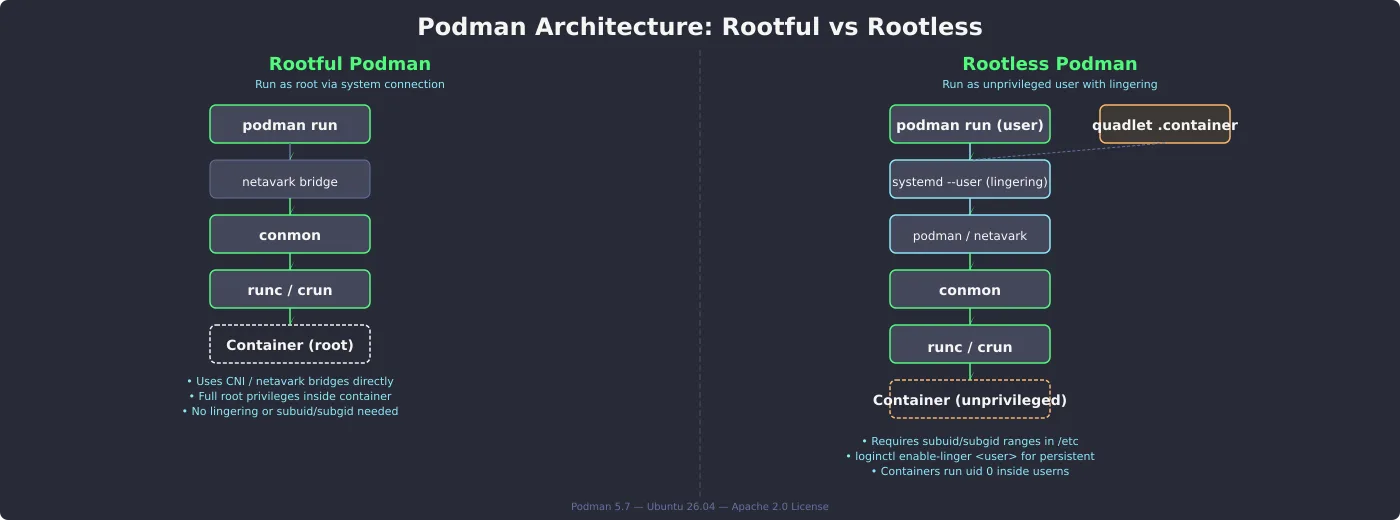
Three things sold me on Podman: no daemon, rootless by default, and systemd quadlet. If you’ve been running Docker containers on a homelab server, try replacing Docker with Podman on the next fresh install. The CLI is drop-in compatible — existing compose files need no change. I already migrated my Vaultwarden and Uptime Kuma setups and neither noticed the difference. Need to free up space? My Docker disk cleanup script works for Podman too — same storage directory structure.