 mz.

I was debugging a late-night file deletion on my server once — someone ran rm -rf /var/backups around 3 AM. I had no idea who, what script, or even which session it was. That is when I started taking auditd seriously. On a modern Linux kernel, auditd is the door that logs every syscall that crosses your rules. Here is how I set it up on Ubuntu 26.04 LTS.
Resources: Linux Audit Userspace (official) | GitHub — linux-audit/audit-userspace.
What auditd Actually Does
auditd lives between the Linux kernel audit subsystem and the disk. The kernel fires an event for every syscall that matches a rule you set — think -w /etc/passwd -p wa for write events, or a syscall rule like -a always,exit -F arch=b64 -S unlink -F dir=/srv. auditd enriches the raw record, adds a timestamp, and writes it to /var/log/audit/audit.log. Tools like ausearch and aureport then mine that log.
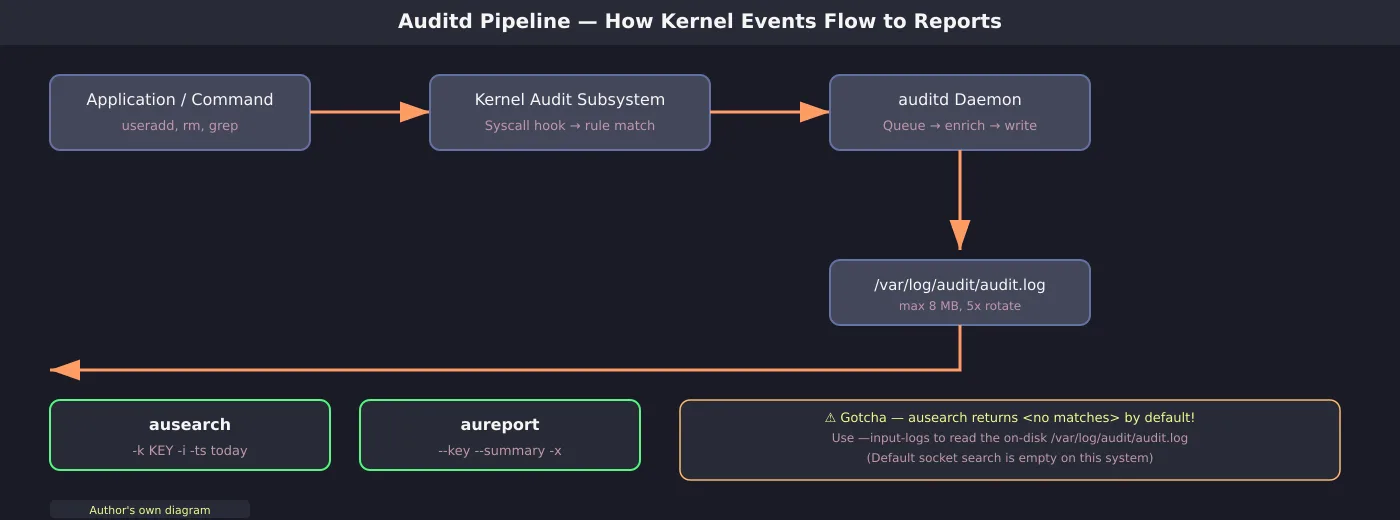
The pipeline in one diagram. App syscall → kernel rule match → auditd daemon → log file → ausearch / aureport for introspection.
Install and Enable
auditd and the command-line tools are in the main repo on Ubuntu:
# apt install
sudo apt-get update && sudo apt-get install -y auditd audispd-plugins

# Verify it is running
systemctl is-active auditd
# → active
systemctl is-enabled auditd
# → enabled

# Check kernel support
auditctl -sThat auditctl -s output confirms the daemon is active, backlog is empty, and zero events have been lost so far — a clean baseline.
First Rule — Watch a File
I started with a simple watch on /etc/passwd. The -w flag monitors a path, -p wa watches for write and attribute changes, and -k identity tags every event with a human-readable key so I can search later.
# Add a watch rule
auditctl -w /etc/passwd -p wa -k identity
# → Old style watch rules are slower (harmless warning)

# List rules
auditctl -l
# → -w /etc/passwd -p wa -k identity

# Generate an event — create a throwaway user
useradd -m auditdemo
userdel -r auditdemoThe “Old style watch rules are slower” warning is normal — on modern kernels -w is emulated through syscall rules. It works fine for a homelab. Now, let us search for those events:
# Search for events with the identity key
ausearch --input-logs -k identity -i | head -20The output tells you the exact command (useradd -m auditdemo), the timestamp, the UID (root), the file accessed (/etc/passwd), and the syscall (openat). The -i flag translates numeric UIDs into names — otherwise you see auid=0 instead of auid=root.
The Gotcha That Bit Me
Here is the thing that cost me half an hour: plain ausearch -k identity returned <no matches> even though the events were clearly in /var/log/audit/audit.log. On this Ubuntu release (auditd 4.1.2), the default path queries the daemon over netlink, which returns nothing. You need --input-logs (or -if /var/log/audit/audit.log) to read the on-disk log file. The man page confirms: “This is needed if you are using ausearch from a cron job.” Add it to your muscle memory.
Syscall Rule — Watch Deletions
File watch rules work, but they do not cover deletions — you need a syscall rule for that. I set one to watch unlink and rename calls inside /var/log (a common forensic gap — an intruder who rm auth.log*):
# Add a syscall rule for /var/log
auditctl -a always,exit -F arch=b64 -S unlink -S unlinkat -S rename -S renameat -S renameat2 -F dir=/var/log -F key=log-tamper

# Generate a deletion event
echo tmp > /var/log/auditdemo-tmp
rm /var/log/auditdemo-tmp

# Search
ausearch --input-logs -k log-tamper -iThe rm command triggers an unlinkat syscall, and the rule captures it with the log-tamper key. The directory-based syscall form avoids cluttering the log with every single syscall on the system.
Make Rules Persistent
Rules added with auditctl -w or -a live in memory and disappear on reboot. Write them into /etc/audit/rules.d/*.rules files (loaded in alphabetical order by augenrules). Here is a practical set:
## /etc/audit/rules.d/90-monitor.rules
# File watches — changes to identity files
-w /etc/passwd -p wa -k identity
-w /etc/group -p wa -k identity
-w /etc/shadow -p wa -k identity
# SSH config — read+tamper
-w /etc/ssh/sshd_config -p rwa -k sshd-config
# Sudoers — write
-w /etc/sudoers -p wa -k sudoers
-w /etc/sudoers.d -p wa -k sudoers
# Deletion tampering in /var/log
-a always,exit -F arch=b64 -S unlink -S unlinkat -S rename -S renameat -S renameat2 -F dir=/var/log -F key=log-tamperLoad them with augenrules --load and check the result:
# Load from rules.d
augenrules --load

# Verify
auditctl -lReports With aureport
aureport aggregates the log into summaries. The key report buckets events per tag — ideal for a daily security review:
# Key summary
aureport --input-logs --key --summaryYou can also run aureport -x --summary to see which executables triggered the most events, or aureport --failed to surface failed syscalls (configuration mistakes, malformed requests — an early sign of scanning).
Watch the Backlog
A busy server can drop events if the kernel queue fills up. Periodically check auditctl -s — the lost field should be zero. If it is not, increase backlog_limit in auditd.conf:
auditctl -s | grep "lost\|backlog"Command Reference
I threw together a cheat card of the commands and config values I use most. Bookmark it or print it and stick it to your monitor:
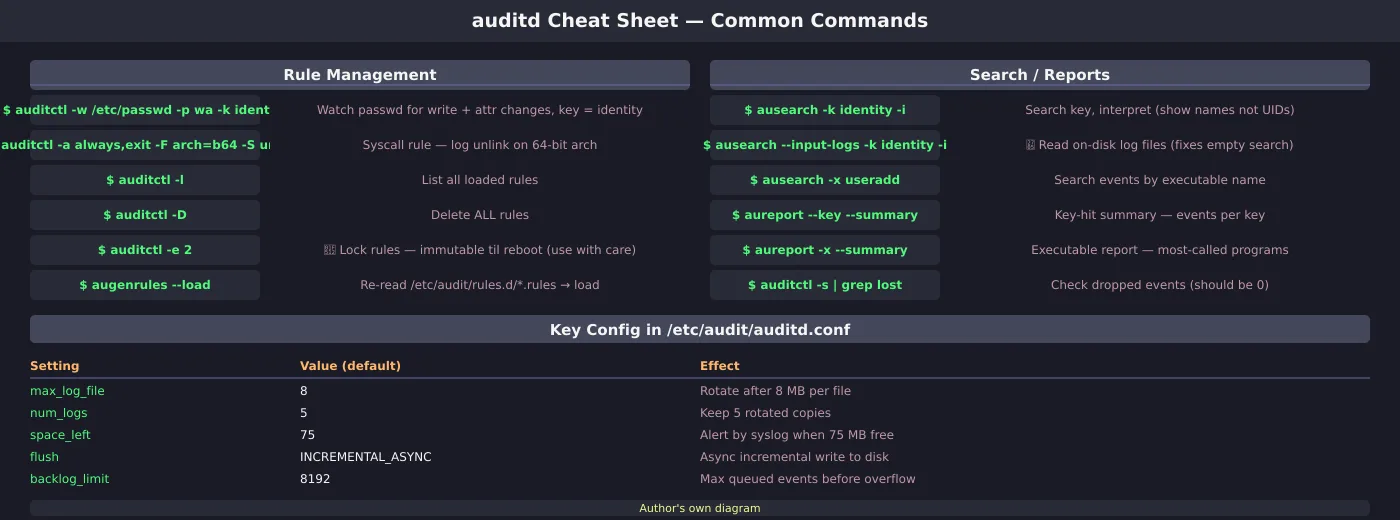
Left column — rule management, right column — search and reporting, bottom row — config settings that I tweaked from the defaults.
You Already Have Auditd
A Linux server that is not running auditd is sitting on a free forensics layer. Even these basic watch rules on passwd, shadow, and sshd_config already give you a trail you can go back to. Pair it with the fail2ban log reporter for perimeter alerts, run the local account auditor to cross-check the passwd events, and combine it with systemd resource limits for a defensible homelab.