 mz.

My nightly rsync job failed three nights in a row and told me exactly nothing. The script exited nonzero, cron mailed the output into a mailbox I never read, and the backup set quietly rotted. That gap is what ntfy fills: a tiny self-hosted server where any script can post a message with one curl call, and every device you subscribe with gets it as a real push notification. Ubuntu 26.04 now ships it in the default repos, so the whole setup is one package install and one config fix. I ran it end to end on a fresh box before writing this, and the first start crashes for a reason the docs never mention.
Official site: https://ntfy.sh
GitHub: binwiederhier/ntfy

What you need
- An Ubuntu 26.04 (resolute) machine on your LAN: a Pi, a homelab server, a VPS
- A phone or laptop with the ntfy app (Android, iOS) or any machine with the CLI
- Basic comfort with systemctl and curl
Install ntfy from the Ubuntu repo
No third-party apt source needed anymore. ntfy 2.11 lives in the universe component of the Ubuntu 26.04 archive, and one package gives you both the server and the client CLI.
sudo apt update
sudo apt install ntfy

dpkg -l ntfy | tail -1
ii ntfy 2.11.0-3 amd64 Send push notifications to your phone or desktopStart it, watch it crash, fix the port
Here is the part that cost me a debugging loop. The packaged unit runs the server as the unprivileged ntfy user, and with the shipped sample config every listen option is commented out, so ntfy falls back to its built-in default of port 80. A non-root process cannot bind port 80, so systemd restart-loops the service into failure within a second:
sudo systemctl enable --now ntfy
sudo journalctl -u ntfy -n 5 --no-pager
... ntfy[910980]: FATAL listen tcp :80: bind: permission denied (exit_code=1)
... systemd[1]: Failed to start ntfy.service - ntfy server.The fix is a one-line edit of /etc/ntfy/server.yml: uncomment listen-http and point it at an unprivileged port. I use 2586 because nothing else in my lab touches it. A sed makes it scriptable:
sudo sed -i 's|^# listen-http: ":80"$|listen-http: ":2586"|' /etc/ntfy/server.yml
sudo systemctl restart ntfy

systemctl is-active ntfy
active
ss -ltnp | grep 2586
LISTEN 0 4096 *:2586 *:* users:(("ntfy",pid=1565456,fd=3))The log confirms it cleanly after that:
Nov 10 03:04:31 runner ntfy[1565456]: INFO Listening on :2586[http], ntfy 2.11.0-3, log level is INFO (tag=startup)Sanity check with the built-in health endpoint:
curl -s localhost:2586/v1/health
{"healthy":true}Publish your first message
Publishing is an HTTP POST. The topic name is part of the URL, so /homelab is topic homelab. The server answers with the JSON of the stored message, including an ID you can use for pagination later:
curl -s -d "Backup finished, 42 files" localhost:2586/homelab
{"id":"gXszZwrnVfUh","time":1794279886,"expires":1794323086,"event":"message","topic":"homelab","message":"Backup finished, 42 files"}Two headers turn this from plain text into something you will actually look at. Priority goes 1 to 5 (5 bypasses silent mode on Android), and Tags takes emoji names that render on the notification:
curl -s -H "Priority: high" -H "Tags: warning" -d "Disk on /dev/sda1 is at 91%" localhost:2586/homelab
{"id":"yIKbOemYT6SU","time":1794279886,"event":"message","topic":"homelab","message":"Disk on /dev/sda1 is at 91%","priority":4,"tags":["warning"]}If you have been hooking alerts into Telegram the way I did in this uptime monitoring script, this is the moment ntfy wins you over: no botfather token, no chat_id, no rate limits. The message is simply cached on your own server, which is what makes the next step so handy.
Read the queue back (and one since-parameter gotcha)
Unlike Telegram, ntfy remembers recent messages, so you can fetch what you missed at any time. Long-poll with poll=1 against the JSON endpoint:
curl -s "localhost:2586/homelab/json?poll=1&since=all"
{"id":"gXszZwrnVfUh","event":"message","topic":"homelab","message":"Backup finished, 42 files"}
{"id":"yIKbOemYT6SU","event":"message","topic":"homelab","message":"Disk on /dev/sda1 is at 91%","priority":4,"tags":["warning"]}Gotcha I hit on 2.11: the relative cursors the online docs show, like since=now-1h, are rejected. This build accepts since=all or a message ID, and anything else returns an invalid since parameter error. Plan your scripts around those two forms.
Subscribe from your phone or another box
Install the ntfy app, point it at http://YOUR-SERVER:2586, add topic homelab, and every curl from above becomes a push on your lock screen. On another Linux machine the CLI subscribes with one command. One detail: the CLI assumes https when you omit the scheme, so on a plain-LAN server write the http:// prefix or you get server gave HTTP response to HTTPS client. I did.
ntfy subscribe http://192.168.0.6:2586/homelab
{"id":"tJ12LgR2yGww","time":1794280757,"event":"message","topic":"homelab","message":"live delivery works","priority":4,"tags":["bell"]}Pass a script as the second argument and ntfy executes it per message, with $NTFY_MESSAGE, $NTFY_PRIORITY and friends in the environment. My quick check:
#!/bin/bash
# handler.sh - runs for every arriving message
echo "handled: $NTFY_MESSAGE (prio $NTFY_PRIORITY)" >> /var/log/ntfy-handled.log

$ ntfy subscribe http://192.168.0.6:2586/hookmode ./handler.sh
# published: "run the handler" with X-Priority: 5
$ cat /var/log/ntfy-handled.log
handled: run the handler (prio 5)The 15-line pattern: wrap any job with backup-notify.sh
This is how it earns its keep: a wrapper that runs your real command, then posts a green or red message depending on the exit code. Drop it next to any rsync job and add one line to crontab. The rsync side of it is the one from my rsync vs rclone benchmark.
#!/usr/bin/env bash
# backup-notify.sh - run a command, report the outcome to ntfy
set -u
NTFY_URL="http://localhost:2586/backups"

if output=$( "$@" 2>&1 ); then
    curl -s -o /dev/null         -H "X-Priority: 3" -H "X-Tags: white_check_mark"         -d "Backup OK: $(echo "$output" | tail -1)"         "$NTFY_URL"
    echo "sent ok notification"
else
    curl -s -o /dev/null         -H "X-Priority: 5" -H "X-Tags: warning"         -d "Backup FAILED: $(echo "$output" | tail -1)"         "$NTFY_URL"
    echo "sent failure notification"
fiI tested both branches against a 9 KB synthetic log dataset (a text file generated for the demo, nothing from a real production set): first a clean rsync, then the same command pointed at a directory that does not exist.
$ ./backup-notify.sh rsync -a --stats /srv/daily/ /mnt/backup/daily/
sent ok notification

$ ./backup-notify.sh rsync -a /srv/gone/ /mnt/backup/daily/
sent failure notification

$ curl -s "localhost:2586/backups/json?poll=1&since=all"
{"id":"XvJGzIWmjdOT","event":"message","topic":"backups","message":"Backup OK: total size is 8,925  speedup is 84.20","priority":3,"tags":["white_check_mark"]}
{"id":"M5nAAnZFV5gz","event":"message","topic":"backups","message":"Backup FAILED: rsync error: some files/attrs were not transferred (see previous errors) (code 23) at main.c(1356) [sender=3.4.1]","priority":5,"tags":["warning"]}The failure message carries rsync’s own last line, which is usually all you need to triage from your phone. Schedule the job with a systemd timer rather than a legacy cron line, and if you are not sure what already fires on your box, this timer audit script lists everything in about ten seconds.
Is it fast enough?
Overkill question, measured anyway. 15 curl publishes against a local 2.11 server on a 2 vCPU runner, timing the full round trip:
for i in $(seq 1 15); do
  curl -s -o /dev/null -w "%{time_total}
" -d "latency probe $i" localhost:2586/latency
done
# min 0.53 ms, mean 0.67 ms, max 0.87 ms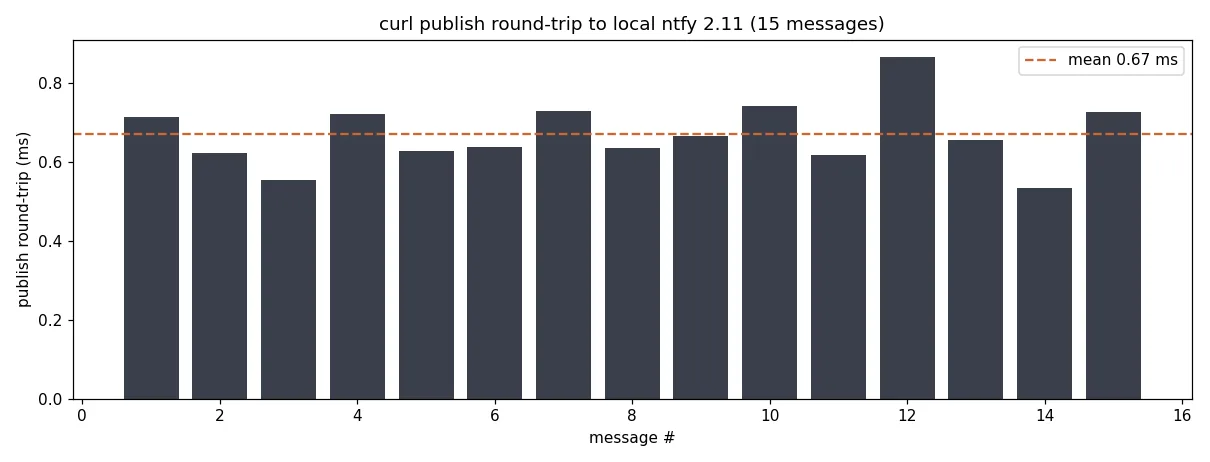
Sub-millisecond per message means the notification path will never be what makes your backup job slow, and the idle server sits in single-digit MB of RAM.
Two hardening notes before you expose it
First: topic names are capability strings. Anyone who can reach port 2586 can publish to any topic, so keep this on the LAN or behind your firewall, and if you want it reachable from outside, put TLS and access control in front of it (ntfy covers access-control in server.yml, or per-user topic permissions). Second: the message cache is plain SQLite under /var/cache/ntfy, and whatever you post sits there unreadable-by-nothing for the retention window. Do not send secrets in messages.
Four commands to a notification bus that replaces the bot-token plumbing I kept re-inventing on every script. The install works out of the box, the port 80 crash is the trap, and everything after it is curl. If your rsync jobs are still emailing a dead mailbox, this is thirty minutes well spent.