 mz.

rsync has lived on every Linux box I have touched since my first mirror script. rclone walked in later and quietly took over anything involving S3. I never stopped to ask which is faster at the plain job of syncing files on a server, until this weekend. So I seeded a 160 MB dataset and made both tools run the exact same four tests.
Official: rsync.samba.org
Project: rclone.org (GitHub)
The setup
Both tools ran on one Ubuntu 26.04 box, source and destination on the same ext4 filesystem. rsync 3.4.1 from apt, rclone v1.75.2 as a static binary. The dataset is synthetic random bytes from a seeded generator (random.seed(7)), 2,324 files across small, medium and big folders, 166 MB total. Nothing to do with live data, so you can rerun every number. I warmed the page cache with a cat pass over the source before every timed run so neither tool got a cold-start penalty.
# dataset: 2000 small files (2-50 KB), 20 medium (2-4 MB), 4 big (10 MB), all urandom
rsync -a --stats ~/src/ ~/dst-rsync/
rclone copy ~/src ~/dst-rclone --stats-one-line -v
rsync -a --no-whole-file --stats ~/src/ ~/dst-rsync/
rclone check ~/src ~/dst-rclone --one-way -vTest 1: first full sync
Cold copy of everything, 158 MB into an empty destination. rsync finished in 0.36 s, rclone in 0.69 s. A 2x gap on a pure disk-to-disk copy, but both are disk-bound here and under a second, so in practice nobody cares.
rsync -a --stats ~/src/ ~/dst-rsync/

Total transferred file size: 158,088,570 bytes
Literal data: 158,088,570 bytes
Matched data: 0 bytes
File list size: 0
File list generation time: 0.001 seconds
File list transfer time: 0.000 seconds
Total bytes sent: 158,247,099
Total bytes received: 38,503
sent 158,247,099 bytes  received 38,503 bytes  316,571,204.00 bytes/sec
total size is 158,088,570 speedup is 1.00rclone copy ~/src ~/dst-rclone --stats-one-line -v
2026/11/09 04:58:52 INFO : small/f_999.bin: Copied (new)
2026/11/09 04:58:52 INFO : small/f_998.bin: Copied (new)
2026/11/09 04:58:52 INFO : small: Set directory modification time (using DirSetModTime)
2026/11/09 04:58:52 INFO : big: Set directory modification time (using DirSetModTime)
2026/11/09 04:58:52 INFO : med: Set directory modification time (using DirSetModTime)
2026/11/09 04:58:52 INFO : 150.765 MiB / 150.765 MiB, 100%, 0 B/s, ETA -Test 2: incremental sync
I rewrote 100 small files and added 300 new ones, about 10.9 MB of change. rsync: 0.10 s. rclone: 0.20 s. Same ranking, and both correctly moved only the changed set.
rsync -a --stats ~/src/ ~/dst-rsync/

Total transferred file size: 10,905,282 bytes
Literal data: 10,905,282 bytes
Matched data: 0 bytes
File list size: 0
File list generation time: 0.001 seconds
File list transfer time: 0.000 seconds
Total bytes sent: 10,971,472
Total bytes received: 7,626
sent 10,971,472 bytes  received 7,626 bytes  21,958,196.00 bytes/sec
total size is 166,435,012 speedup is 15.16rclone copy ~/src ~/dst-rclone --stats-one-line -v
2026/11/09 04:58:52 INFO : small/f_97.bin: Copied (replaced existing)
2026/11/09 04:58:52 INFO : small/f_96.bin: Copied (replaced existing)
2026/11/09 04:58:52 INFO : small/f_99.bin: Copied (replaced existing)
2026/11/09 04:58:52 INFO : small/f_98.bin: Copied (replaced existing)
2026/11/09 04:58:52 INFO : small: Set directory modification time (using SetModTime)
2026/11/09 04:58:52 INFO : 10.400 MiB / 10.400 MiB, 100%, 0 B/s, ETA -Test 3: one byte inside a 10 MB file
This is where the tools diverge. I flipped a single byte in the middle of a 10 MB file. One gotcha first: rsync defaults to whole-file copies when source and destination are local, so you need –no-whole-file to see its famous delta algorithm on a local run. Over ssh it is on by default. The delta sent 3,232 bytes of literal data (63,749 total), a speedup of 1,999.05x. rclone has no delta transfer at all: it re-copied the whole 10 MiB file, 0.16 s against 0.07 s.
rsync -a --no-whole-file --stats ~/src/ ~/dst-rsync/

Total file size: 166,435,012 bytes
Total transferred file size: 10,485,760 bytes
Literal data: 3,232 bytes
Matched data: 10,482,528 bytes
File list size: 0
File list generation time: 0.001 seconds
File list transfer time: 0.000 seconds
Total bytes sent: 63,749
Total bytes received: 19,508
sent 63,749 bytes  received 19,508 bytes  166,514.00 bytes/sec
total size is 166,435,012 speedup is 1,999.05rclone copy ~/src ~/dst-rclone --stats-one-line -v
2026/11/09 04:59:46 INFO : big/b_3.bin: Copied (replaced existing)
2026/11/09 04:59:46 INFO : big: Set directory modification time (using SetModTime)
2026/11/09 04:59:46 INFO : 10 MiB / 10 MiB, 100%, 0 B/s, ETA -Test 4: checksum verify
rsync -rcn dry-runs a checksum comparison, 0.13 s. rclone check hashes both trees with md5, 0.48 s, and reported 0 differences across 2,324 files. Debug note: my first attempt used rclone check –statistics, which v1.75.2 rejects as an unknown flag (exit 2). Plain -v already prints the counts.
rsync -rcn --stats ~/src/ ~/dst-rsync/

Literal data: 0 bytes
Matched data: 0 bytes
File list size: 65,533
File list generation time: 0.001 seconds
File list transfer time: 0.000 seconds
Total bytes sent: 84,674
Total bytes received: 22
sent 84,674 bytes  received 22 bytes  56,464.00 bytes/sec
total size is 166,435,012 speedup is 1,965.09 (DRY RUN)rclone check ~/src ~/dst-rclone --one-way -v
2026/11/09 04:59:47 INFO : Using md5 for hash comparisons
2026/11/09 04:59:47 NOTICE: Local file system at /var/tmp/rrbench/dst-rclone: 0 differences found
2026/11/09 04:59:47 NOTICE: Local file system at /var/tmp/rrbench/dst-rclone: 2324 matching files
2026/11/09 04:59:47 INFO :
Transferred: 0 B / 0 B, -, 0 B/s, ETA -
Checks: 2324 / 2324, 100%, Listed 4654
Elapsed time: 0.4s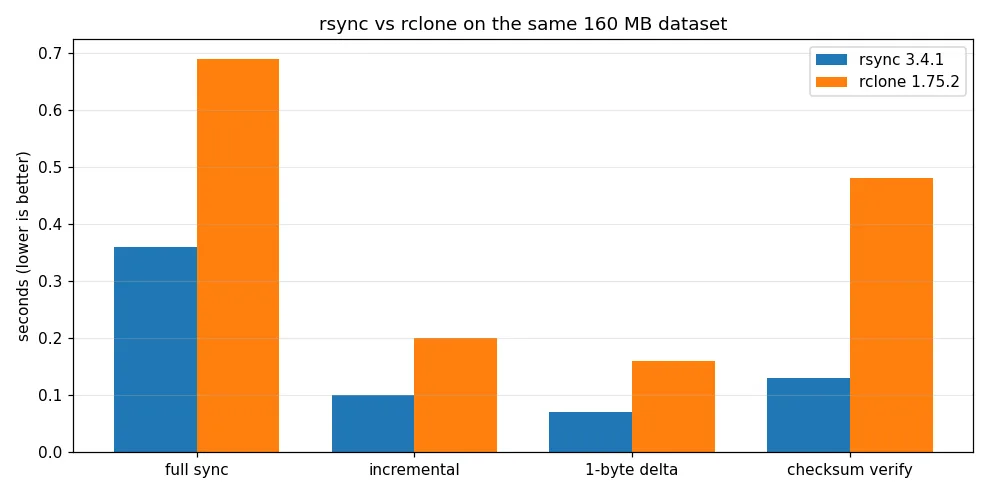
Side by side
| Aspect | rsync | rclone |
|---|---|---|
| First full sync (158 MB) | 0.36 s | 0.69 s |
| Incremental (400 files changed) | 0.10 s | 0.20 s |
| 1 byte edited in 10 MB file | 3,232 bytes literal, speedup 1,999.05x | whole 10 MiB re-copied, 0.16 s |
| Checksum verify 166 MB | 0.13 s dry run | 0.48 s (0 diffs, 2324 files)) |
| Delta transfer | built in (needs –no-whole-file locally) | none, whole files only |
| Remote targets | ssh, rsync daemon | 40+ cloud backends, sftp, crypt |
| Encryption in transit | whatever ssh gives you | native rclone crypt |
| Install | in every distro repo | static binary or one-liner script |
The annoying parts
rsync: no cloud support, no native encryption, and the local –whole-file default hides its best feature until you go remote. rclone: it prints a NOTICE about a missing config file on every invocation, check subcommand flags drift between versions (my –statistics dead end), and the Go runtime feels heavier to script around than rsync one-liners in cron.
Verdict
For nightly syncs between machines you own, over ssh, rsync wins outright: the delta algorithm turns a 10 MB file edit into a few kilobytes on the wire, and it is already installed. Pick rclone the moment the destination is not a filesystem you can mount or ssh into: S3, B2, or anything needing crypt. If your goal is versioned backups rather than mirroring, both lose to purpose-built tools, I measured restic vs borg for that. And whatever you pick, wire the schedule into a job you can audit: I wrote a cron and systemd timer hygiene script for exactly that.
Two tools, one honest answer per job. The whole harness is twenty lines of shell, so run it against your own dataset before trusting either graph.