The disk-full alert fired at 3am, and of course it was the box running Docker. `du -sh /var/lib/docker` said 324K, `df` said the disk was nearly gone, and none of the usual suspects added up. What I actually needed was a repeatable way to see what Docker was holding and claw it back, so I wrote this bash script.
Built against Docker 29 on Ubuntu 26.04. Docs I leaned on: docker system df and the pruning reference.
What it cleans
Stopped containers, images nothing references anymore, networks nobody uses, and the build cache. Each one is a one-liner in plain docker, but the point is seeing the whole picture before deleting anything, plus a before/after number you can paste into a ticket. The script reports by default and only deletes when you pass –prune.
Requirements
A Docker host where you can run docker commands (nothing needs to be root if your user is in the docker group).
numfmt from coreutils for the byte formatting (present on every Ubuntu I have touched).
Read access to /var/lib/docker and /var/lib/containerd if you want the footprint line in the report.
The script
I built this in a throwaway lab VM with Docker 29.1.3, seeded it with junk (three exited containers, an orphaned network, an image nothing used) and ran every mode against that. The outputs below are the real captured stdout, and the whole dataset is synthetic: no real workload was touched.
#!/usr/bin/env bash# docker-reclaim.sh - report and clean up Docker disk hogs# (c) 2026 mzulfahmy - MIT## Run without arguments for a report only. Nothing gets deleted.# -p, --prune prune exited containers, dangling images, unused networks# -a, --all also remove unused *tagged* images (image prune -a)# -c, --cache also clear the build cache# -h, --help this help## Exit codes: 0 ok, 1 error, 2 nothing to do (prune mode).set -euo pipefailPRUNE=0 ALL=0 CACHE=0usage() { sed -n '2,13p' "$0" | sed 's/^# \{0,1\}//'; }for arg in "$@"; do case "$arg" in -p|--prune) PRUNE=1 ;; -a|--all) ALL=1 ;; -c|--cache) CACHE=1 ;; -h|--help) usage; exit 0 ;; *) echo "unknown option: $arg" >&2; usage >&2; exit 1 ;; esacdonecommand -v docker >/dev/null || { echo "docker not found in PATH" >&2; exit 1; }docker info >/dev/null 2>&1 || { echo "cannot talk to the docker daemon" >&2; exit 1; }# Total footprint of the docker data root in bytes. Docker 25+ ships the# containerd snapshotter, which stores blobs outside DockerRootDir (usually# /var/lib/containerd), so sum both trees.ROOT="$(docker info -f '{{.DockerRootDir}}')"CTRD="${ROOT%/docker}/containerd"footprint() { local total=0 n for d in "$ROOT" "$CTRD"; do [ -d "$d" ] || continue n="$(du -sx --block-size=1 "$d" 2>/dev/null | awk '{print $1}')" total=$((total + n)) done echo "$total"}human() { numfmt --to=iec --suffix=B "$1" 2>/dev/null || echo "${1}B"; }report() { echo "== Docker disk report: $ROOT (+ $CTRD) ==" printf "dockerd data root : %s\n" "$(human "$(footprint)")" docker system df echo "-- exited containers:" E="$(docker ps -aq --filter status=exited | wc -l)" echo " $( [ "$E" -eq 0 ] && echo 'none' || echo "$E container(s): $(docker ps -a --filter status=exited --format '{{.Names}}' | paste -sd, -)" )" echo "-- unused networks:" NU="$(docker network ls -q --filter dangling=true | wc -l)" echo " $( [ "$NU" -eq 0 ] && echo 'none' || docker network ls --filter dangling=true --format ' {{.Name}} ({{.Driver}})' )" echo "-- images without a tag (dangling):" DI="$(docker images -f dangling=true -q | wc -l)" echo " $( [ "$DI" -eq 0 ] && echo 'none' || echo "$DI image(s)" )"}BEFORE="$(footprint)"if [ "$PRUNE" -eq 0 ]; then report echo echo "(report only - re-run with --prune to actually remove things)" exit 0fireportechoecho "== pruning =="# 1. stopped containers (their writable layers are the first to pile up)if C="$(docker container prune -f)"; then echo "$C"; fi# 2. dangling images onlyif I="$(docker image prune -f)"; then echo "$I"; fi# 3. networks nothing points atif N="$(docker network prune -f)"; then echo "$N"; fi# 4. optional: every image no container uses, not just dangling onesif [ "$ALL" -eq 1 ]; then if IA="$(docker image prune -a -f)"; then echo "$IA"; fifi# 5. optional: build cacheif [ "$CACHE" -eq 1 ]; then if BC="$(docker builder prune -f)"; then echo "$BC"; fifiAFTER="$(footprint)"RECLAIMED=$((BEFORE - AFTER))echoecho "Docker data root: $(human "$BEFORE") -> $(human "$AFTER")"echo "Reclaimed: $(human "$RECLAIMED")"[ "$RECLAIMED" -gt 0 ] || exit 2
Step 1: look before you touch
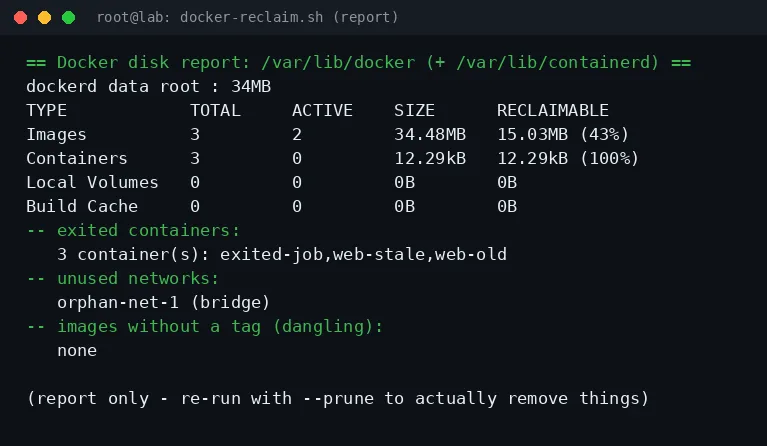
Run it with no arguments. The default mode only reads the daemon and prints what is reclaimable: exited containers by name, dangling networks, untagged images, and the footprint of the whole data root.
== Docker disk report: /var/lib/docker (+ /var/lib/containerd) ==dockerd data root : 34MBTYPE TOTAL ACTIVE SIZE RECLAIMABLEImages 3 2 34.48MB 15.03MB (43%)Containers 3 0 12.29kB 12.29kB (100%)Local Volumes 0 0 0B 0BBuild Cache 0 0 0B 0B-- exited containers: 3 container(s): exited-job,web-stale,web-old-- unused networks: orphan-net-1 (bridge)-- images without a tag (dangling): none(report only - re-run with --prune to actually remove things)
Report mode output (synthetic lab data)
Step 2: reclaim it
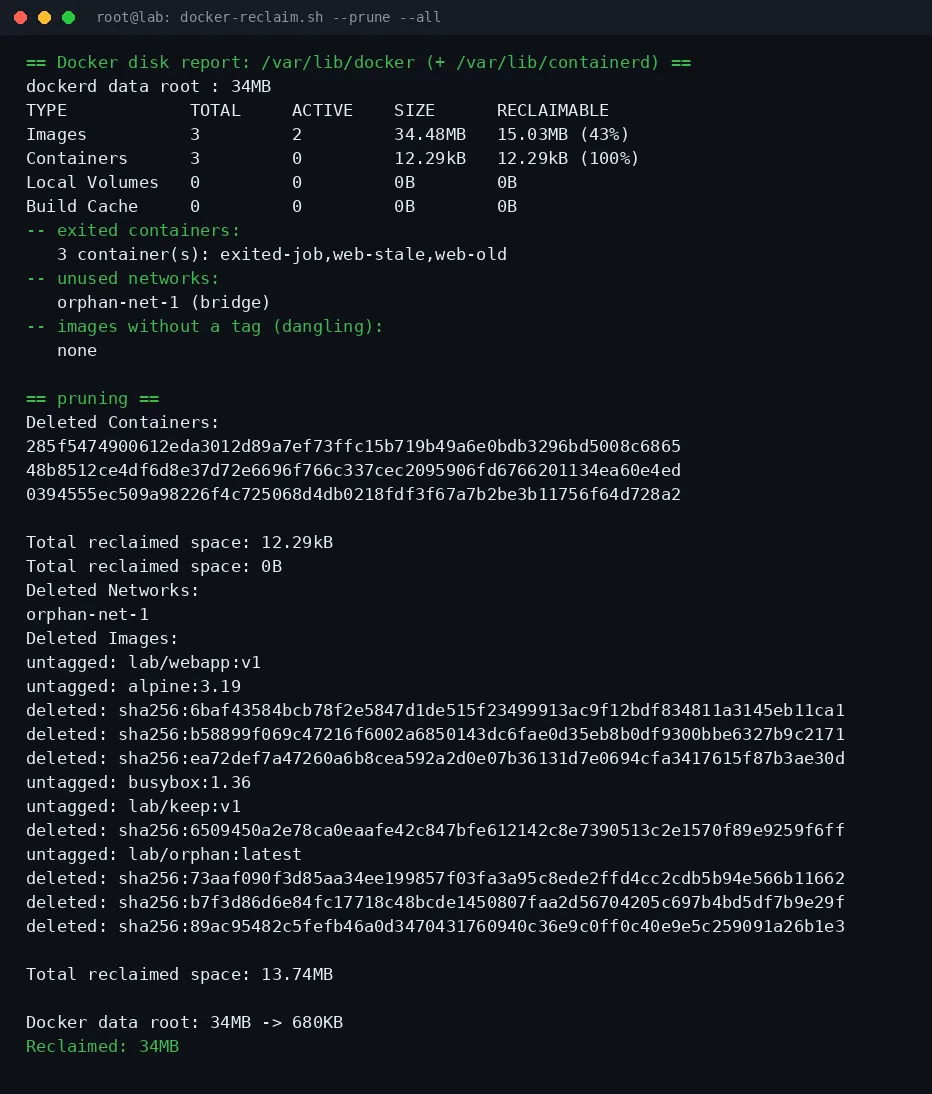
–prune removes exited containers, untagged images and unused networks. Add –all to also drop tagged images no container uses, and –cache for the build cache. The script prints the data-root footprint before and after, so the reclaimed number is real, not the sum of docker’s own optimistic estimates.
The 324K vs 34MB mystery above: Docker 25+ moved to the containerd snapshotter, and with it the blobs live in /var/lib/containerd, not under DockerRootDir. Measuring only /var/lib/docker said “nothing to clean” while the disk was vanishing. The script adds both trees in footprint() and the report now agrees with df.
Second: on this storage driver there are no dangling images at all, the containerd snapshotter untags eagerly. That is why –all exists: the interesting reclaimable space was in the tagged-but-unused image (15 MB in the lab), and image prune without -a would have recovered nothing.
Cron it
For a weekly sweep, drop this in root’s crontab. The exit code is 2 when there was nothing to do, so grep the log for “Reclaimed: 0B” instead of relying on the exit status alone:
Three weeks in, this has caught two containers from abandoned experiments and one image that was 1.4 GB of stale layers. It pairs well with the df, du and ncdu walkthrough for the flip side of the same problem, my Uptime Kuma stack is exactly the kind of long-running container that quietly leaves exited siblings behind, and the Open WebUI instance taught me to never trust a pulled model’s size to stay put.
The script is short enough to read top to bottom before you trust it, which is the whole idea: docker prune already exists, but a wrapped report-first version is what gets actually cronned instead of run once and forgotten.
 mz.